Tuesday, September 20, 2016

Sometimes I want to run a bunch of statements (like updating a bunch of stats or re-indexing a number of indexes) and I want to reduce the chance that these statements will interfere with other processes in the database. I created a script which loops over each statement to be executed and then checks to see if the database is currently in use (has any "Runnable" processes and if it does, waits until all "Runnable" processes have completed, then runs the statement and then starts over with the next statement.

I know that for many this won't be of value, because your systems are too busy for this to make sense and I also know that a new process could start while I'm running one of my statements, so this isn't fool-proof by any means.
-- ========================================================================
-- Author:  Eric Zierdt
-- Create date: 9/20/2016
-- Description: Checks database for running processes and Runs 
--    series of statements when free and emails when complete
-- ========================================================================


/*********************************************************************
 **  CODE TO CREATE THE TABLE TO STORE THE QUERIES YOU WANT TO RUN **
 *********************************************************************/
/*
IF EXISTS (SELECT * FROM tempdb.dbo.sysobjects WHERE ID = OBJECT_ID(N'tempdb..##TABLE'))
BEGIN
 DROP TABLE ##TABLE
END
CREATE TABLE ##TABLE (ID INT IDENTITY(1,1), Code VARCHAR(MAX),Complete BIT DEFAULT 0)
INSERT INTO ##TABLE
( Code )
VALUES
('UPDATE STATISTICS [Table] [Stat] WITH FULLSCAN')
*/
SET NOCOUNT ON

/*****************************************************************************************
 **  CREATING ##StartTime TABLE TO BE USED IN REMAINING TIME ESTIMATES IN OTHER QUERY. **
 **  SETTING TO GLOBAL TEMP TABLE SO ACCESSABLE IN ANOTHER WINDOW      **
 *****************************************************************************************/
IF EXISTS (SELECT * FROM tempdb.dbo.sysobjects WHERE ID = OBJECT_ID(N'tempdb..##StartTime'))
BEGIN
 DROP TABLE ##StartTime
END
CREATE TABLE ##StartTime (StartTime DATETIME)
INSERT INTO ##StartTime VALUES  ( GETDATE() )
PRINT 'Start Time: ' + CONVERT(VARCHAR(25), GETDATE(), 101) + ' ' + CONVERT(VARCHAR(25), GETDATE(), 108)
GO

/*****************************************************************************************
 **  CREATING ##StartTime TABLE TO BE USED IN REMAINING TIME ESTIMATES IN OTHER QUERY. **
 **  SETTING TO GLOBAL TEMP TABLE SO ACCESSABLE IN ANOTHER WINDOW      **
 *****************************************************************************************/
DECLARE @ID INT
  ,@SQL VARCHAR(MAX)
  ,@StartTime DATETIME = GETDATE()
  ,@EndTime DATETIME
WHILE 
(
 SELECT COUNT(1)
 FROM ##TABLE
 WHERE Complete = 0
) >= 1
BEGIN 
 WHILE 
 (
  /**************************************************************
   **  CHECKING TO SEE IF DATABASE HAS NO 'RUNNABLE' PROCESSES **
   **************************************************************/
  SELECT  COUNT(1)
  FROM    sys.sysprocesses S
  WHERE   status = 'runnable'
    AND DB_NAME(S.dbid) = DB_NAME()
    AND S.spid <> @@SPID
 ) > 0   
 BEGIN   
  WAITFOR DELAY '00:00:05';  ---CHANGE TO MEET YOUR NEEDS; THIS IS SAYING, RETRY EVERY 5 SECONDS TO SEE IF DATABASE IS FREE TO DO WORK
 END
 /*************************************************
  ** NO 'RUNNING' PROCESSES DETECTED, RUN QUERY **
  *************************************************/
 SELECT TOP 1 @ID=ID, @SQL=Code FROM ##TABLE WHERE Complete = 0
 EXEC(@SQL)
 UPDATE ##TABLE SET Complete = 1 WHERE ID = @ID
END

/*********************************************
 ** SET END TIME AND PRINT RUN TIME STATS **
 *********************************************/
SET @EndTime = GETDATE()
PRINT 'End Time: ' + CONVERT(VARCHAR(25), @EndTime, 101) + ' ' + CONVERT(VARCHAR(25), @EndTime, 108)
PRINT 'Run Time: ' + CONVERT(VARCHAR, DATEADD(ms,DATEDIFF(ms,@StartTime,@EndTime),0),108)

/*************
 ** CLEANUP **
 *************/
DROP TABLE ##TABLE
DROP TABLE ##StartTime

/*********************************************
 ** SEND EMAIL NOTIFICATION OF COMPLETION **
 *********************************************/
DECLARE @buffer_memory_used_MB FLOAT
  ,@Body VARCHAR(MAX)
  ,@Subject VARCHAR(255) = 'Auto Run Script Complete'
  ,@To VARCHAR(512) = ''
SET @Body = '

The script has completed processing queries.
Run Time: ' + CONVERT(VARCHAR, DATEADD(ms,DATEDIFF(ms,@StartTime,@EndTime),0),108) + ' ' EXEC msdb.dbo.sp_send_dbmail @recipients = @To , @subject = @Subject , @body = @Body , @body_format = 'HTML'

In another window I will often run this on occasion to get some stats and an idea of how long it will run for:
DECLARE @Completed FLOAT
  ,@CompletedStatements FLOAT
  ,@Total FLOAT
  ,@TotalStatements FLOAT
  ,@PercentComplete FLOAT 
  ,@StartDate DATETIME

SELECT @StartDate=StartTime FROM ##StartTime
DECLARE @RunTime BIGINT = DATEDIFF(SECOND,@StartDate,GETDATE())

SELECT @CompletedStatements = COUNT(1) FROM ##Table WHERE fixed = 1
SELECT @TotalStatements = COUNT(1) FROM ##Table
SELECT @Completed = SUM([RowCount]) FROM ##Table WHERE fixed = 1
SELECT @Total = SUM([RowCount]) FROM ##Table
SELECT @PercentComplete = 100*(@Completed/@Total)
DECLARE @SecondPerRecord FLOAT = CAST(@RunTime AS FLOAT)/@Completed
DECLARE @EstRemainingSeconds BIGINT = @SecondPerRecord*(@Total-@Completed)
SELECT @Total TotalRecords, @Completed CompletedRecords, @TotalStatements as TotalStatements, @CompletedStatements as CompletedStatements, @PercentComplete [% Complete], @RunTime RunTimeSeconds, @SecondPerRecord SecondPerRecord, @EstRemainingSeconds EstRemainingSeconds
  ,@EstRemainingSeconds/60.0 EstRemainingMins, @EstRemainingSeconds/3600.0 EstRemainingHours

Please comment below and let me know if you found value in this post.

Eric

Wednesday, March 9, 2016

Get Fast Rowcount

I came up with this little gem a while ago, I use it when I'm trying to get a rowcount on a large table, where it's so large that it takes a long time for a simple SELECT COUNT(1) FROM xxx to return data.

DECLARE @TableName sysname
SET @TableName = 'TableName'

SELECT SUM(row_count) AS [RowCount]
FROM sys.dm_db_partition_stats
WHERE object_id=OBJECT_ID(@TableName)   
AND (index_id=0 or index_id=1);

Thursday, March 3, 2016

Script - Email on Job Completion

Sometimes I have long running agent jobs (like say a backup job) and I don't want to do work on the server while the specific job is running; so I've come up with a quick and easy script using the sp_send_dbmail ability to monitor for the job completion and then email me. I've done similar things with some manual tasks that take a while (index reindex or update stats) so I am notified when the script completes.

-- ===============================================
-- Author:  Eric Zierdt
-- Create date: 3/3/2016
-- Description: Emails upon agent job completion
-- ===============================================
DECLARE @JOB_NAME SYSNAME = N'AdventureWorks Backup'; -- NAME OF AGENT JOB
 
WHILE EXISTS
(     
 SELECT  1
 FROM    msdb.dbo.sysjobs_view job
 JOIN msdb.dbo.sysjobactivity activity ON job.job_id = activity.job_id
 JOIN msdb.dbo.syssessions session ON session.session_id = activity.session_id
 JOIN ( 
    SELECT   MAX(agent_start_date) AS max_agent_start_date
    FROM     msdb.dbo.syssessions
   ) session_max ON session.agent_start_date = session_max.max_agent_start_date
 WHERE   activity.run_Requested_date IS NOT NULL
   AND activity.stop_execution_date IS NULL
   AND job.name = @JOB_NAME 
   --AND activity.start_execution_date > CAST(GETDATE() AS DATE)
) 
BEGIN      
     WAITFOR DELAY '00:00:45'; -- SET HOW OFTEN YOU WANT YOUR JOB TO CHECK
END 

DECLARE @buffer_memory_used_MB FLOAT
  ,@Body VARCHAR(MAX)
  ,@Subject VARCHAR(255) = 'Job Complete'
  ,@To VARCHAR(512) = 'user@email.com' -- INSERT YOUR EMAIL ADDRESS HERE
SET @Body = '

The monitored job has completed running.' EXEC msdb.dbo.sp_send_dbmail @recipients = @To , @subject = @Subject , @body = @Body , @body_format = 'HTML'

Tuesday, October 13, 2015

Statistic Repository

I have seen posts from many great SQL masters saying that the first thing they do when diagnosing a performance problem is to update the stats or review the stats; I too have seen the power of updated stats, so when an internal customer of mine was having some issues with stats, it became helpful for me to create a Stats Repository to track and monitor changes in statistics.

The idea is, record once a day the stats info on each statistic in a given database, this can be done across servers (Prod, Test, Dev, etc) if you want to compare to see why something runs better on one server and not on another.

The first step is to create a holding table, if you have a DBA database to store maintenance stuff, put it there, but for this post I'll use master:

------------------------------------------------------
-- SETUP STORAGE TABLE TO STORE DAILY STATS DETAILS --
------------------------------------------------------
USE [master]
GO

/****** Object:  Table [dbo].[StatsHistory]  ******/
SET ANSI_NULLS ON
GO

SET QUOTED_IDENTIFIER ON
GO

SET ANSI_PADDING ON
GO

CREATE TABLE [dbo].[StatsHistory](
 [ServerName] [sysname] NULL,
 [DatabaseName] [sysname] NULL,
 [TableName] [sysname] NULL,
 [StatName] [sysname] NOT NULL,
 [Updated] [datetime] NULL,
 [TableRows] [int] NULL,
 [RowsSampled] [int] NULL,
 [PercentSampled] [float] NULL,
 [Steps] [int] NULL,
 [Density] [int] NULL,
 [AverageKeyLength] [int] NULL,
 [StringIndex] [varchar](3) NULL,
 [FilterExpression] [varchar](512) NULL,
 [UnfilteredRows] [int] NULL,
 [StatColumns] [varchar](500) NULL,
 [BatchRunID] [int] NULL,
 [CreateDate] [datetime] NULL
) ON [PRIMARY]
The next step is to create a function that will be used to concatenate the columns for the Stat into a list. Because of how sys.stats_columns works, you'll need to put this in every database you want to monitor

-----------------------------------------------------
-- NEEDS TO BE RUN FOR EVERY DB YOU ARE MONITORING --
--     THIS FUNCTION CREATES A LIST OF COLUMNS     --
--       INCLUDED IN THE PASSED IN STATISTIC       --
-----------------------------------------------------

USE []
GO

/****** Object:  UserDefinedFunction [dbo].[StatColumnIDToList]    Script Date: 12/19/2014 10:11:01 ******/
SET ANSI_NULLS ON
GO

SET QUOTED_IDENTIFIER ON
GO

-- =============================================
-- Author:  Eric Zierdt
-- Create date: 12/9/2014
-- Description: Converts the ColumnIDs to a List
-- USE: SELECT dbo.StatColumnIDToList(357576312,2)
-- =============================================
CREATE FUNCTION [dbo].[StatColumnIDToList] 
(
 -- Add the parameters for the function here
 @ObjectID INT
 ,@StatsID INT
)
RETURNS VARCHAR(2000)
AS
BEGIN
 -- Declare the return variable here
 DECLARE @List VARCHAR(2000)

 SELECT @List = COALESCE(@List + ',', '') + Cast(SC.column_id As varchar(5))
 FROM sys.stats_columns SC 
 WHERE SC.object_id = @ObjectID AND SC.stats_id = @StatsID

 -- Return the result of the function
 RETURN @List

END
The next step is to create a job which you will schedule to run daily. This job should execute the following code to generate the stat info and insert it into the table we made in step 1:

-- =================================================
-- Author:  Eric Zierdt
-- Create date: 12/9/2014
-- Description: INSERTS STATS DATA INTO REPOSITORY
-- =================================================
DECLARE @ServerName VARCHAR(120)
  ,@DBName VARCHAR(120)
  ,@TableName VARCHAR(120)
  ,@StatName VARCHAR(120)
  ,@SQL VARCHAR(MAX)
  ,@BatchRunID INT
  ,@ColumnList VARCHAR(2000)
  
SELECT @BatchRunID = MAX(BatchRunID)+1
FROM master.dbo.StatsHistory
  

CREATE TABLE #StatsTable (
 ServerName SYSNAME NULL
 ,DatabaseName SYSNAME NULL
 ,TableName SYSNAME NULL
 ,StatName SYSNAME
 ,Updated DATETIME
 ,TableRows INT
 ,RowsSampled INT
 ,PercentSampled AS CAST(RowsSampled AS FLOAT)/CAST(TableRows AS FLOAT)*100 
 ,Steps INT
 ,Density INT
 ,AverageKeyLength INT
 ,StringIndex VARCHAR(3)
 ,FilterExpression VARCHAR(512)
 ,UnfilteredRows INT
 ,StatColumns VARCHAR(500)
 ,BatchRunID INT
 ,CreateDate DATETIME
)

CREATE NONCLUSTERED INDEX [IDX_StatTable_Name] ON #StatsTable
(
 [TableName] ASC
) WITH (PAD_INDEX = OFF, STATISTICS_NORECOMPUTE = OFF, SORT_IN_TEMPDB = OFF, DROP_EXISTING = OFF, ONLINE = OFF
  , ALLOW_ROW_LOCKS = ON, ALLOW_PAGE_LOCKS = ON) ON [Primary]

DECLARE ZCursor CURSOR LOCAL FAST_FORWARD FOR
(
    SELECT  @@SERVERNAME AS ServerName, DB_NAME() AS DBName, OBJECT_NAME(object_id) AS TableName 
           ,name AS StatName, dbo.StatColumnIDToList(object_id,stats_id)
    FROM    sys.stats
    WHERE   OBJECT_NAME(object_id) NOT LIKE ''sys%''
            AND OBJECT_NAME(object_id) NOT LIKE ''MS%''
            AND OBJECT_NAME(object_id) NOT LIKE ''queue%'' 
            AND OBJECT_NAME(object_id) NOT LIKE ''filestream%'' 
            --AND OBJECT_NAME(object_id) = ''MSdistribution_agents''
)
OPEN ZCursor 
FETCH NEXT FROM ZCursor INTO @ServerName, @DBName, @TableName,@StatName,@ColumnList
 WHILE @@FETCH_STATUS = 0
 BEGIN
  --PRINT @StatName
  SET @SQL = ''DBCC SHOW_STATISTICS ('' + @TableName+ '',"'' + @StatName +''") WITH STAT_HEADER,NO_INFOMSGS ;''
  --PRINT @SQL
  INSERT INTO #StatsTable
  (
   StatName
   ,Updated
   ,TableRows
   ,RowsSampled
   ,Steps
   ,Density
   ,AverageKeyLength
   ,StringIndex
   ,FilterExpression
   ,UnfilteredRows
  )
  EXEC(@SQL)

  UPDATE #StatsTable
  SET TableName = @TableName
   ,DatabaseName = @DBName
   ,ServerName = @ServerName
   ,BatchRunID = @BatchRunID
   ,StatColumns = @ColumnList
   ,CreateDate = GETDATE()
  WHERE TableName IS NULL

  FETCH NEXT FROM ZCursor INTO @ServerName, @DBName, @TableName,@StatName,@ColumnList
 END

CLOSE ZCursor
DEALLOCATE ZCursor

--SELECT * FROM #StatsTable WHERE TableRows <> RowsSampled ORDER BY TableName

INSERT INTO master.dbo.StatsHistory
(
 ServerName
 ,DatabaseName
 ,TableName
 ,StatName
 ,Updated
 ,TableRows
 ,RowsSampled
 ,PercentSampled
 ,Steps
 ,Density
 ,AverageKeyLength
 ,StringIndex
 ,FilterExpression
 ,UnfilteredRows
 ,StatColumns
 ,BatchRunID
 ,CreateDate 
)
SELECT ServerName
  ,DatabaseName
  ,TableName
  ,StatName
  ,Updated
  ,TableRows
  ,RowsSampled
  ,PercentSampled
  ,Steps
  ,Density
  ,AverageKeyLength
  ,StringIndex
  ,FilterExpression
  ,UnfilteredRows
  ,StatColumns
  ,BatchRunID
  ,CreateDate 
FROM #StatsTable

DROP TABLE #StatsTable
Now you can do some fun things with your repository table, like this:

-- =====================================================
-- Author:  Eric Zierdt
-- Create date: 12/9/2014
-- Description: SAMPLE CODE TO QUERY STATS REPOSITORY
-- =====================================================
DECLARE @BatchRunID INT
SELECT  @BatchRunID = MAX(BatchRunID) FROM master.dbo.StatsHistory

/**  SEE ALL STATS **/
SELECT  *
FROM    master.dbo.StatsHistory
WHERE BatchRunID = @BatchRunID

/**  SEE ALL STATS OLDER THAN 1 MONTH  **/
SELECT  *
FROM    master.dbo.StatsHistory
WHERE BatchRunID = @BatchRunID
  AND Updated < DATEADD(MONTH,-1,GETDATE())

/**  SEE ALL NON-FULLSCAN STATS  **/
SELECT  *
FROM    master.dbo.StatsHistory
WHERE BatchRunID = @BatchRunID
  AND PercentSampled < 100


/**  CREATE UPDATE STAT SCRIPT FOR ALL NON-FULLSCAN STATS  **/
SELECT  TableName, StatName, TableRows, PercentSampled, 'UPDATE STATISTICS dbo.' + TableName + ' ' + StatName + ' WITH FULLSCAN --' + CAST(TableRows AS VARCHAR(10)) AS SQLCode
FROM    master.dbo.StatsHistory
WHERE   BatchRunID = @BatchRunID
  AND PercentSampled < 100

Tuesday, December 10, 2013

Review of SQL Elements by Idera

Idera SQL Elements Review

I work for a large company which has well over 600 instances of SQL Server installed; we are constantly adding instances to our inventory. Managing our portfolio of instances is a challenge and to help ourselves out we created a series of tables which store server/instance information. Daily an SSIS job and Powershell scripts interrogate the various instances to collect basic information about them, like number/name of databases, disk size, up/down status, backup information, etc. We have been looking for a commercial solution to manage this for us and give us more options for a few years, but unable to find such a product.

Two months ago I was contacted by an Idera sales person who was interested in finding out if I was interested in one of their fine products and while we were talking, I told him what we were looking for in an inventory tool and asked him if they had a tool that would fit our needs. I expected to find out that they didn’t have anything and that what I wanted was a CMDB (configuration management database) solution; however that isn’t what he told me. He told me that Idera was going to debut a new solution called SQL Elements at PASS Summit that would do exactly what we needed and told me to sign up for the Beta program. I was a bit skeptical at first, but I signed up for the Beta program and hoped for the best.

My first impression was a bit of uncertainty, upon signing up for the Beta, I was placed on a wait list until I could be approved, I was afraid this might take a while and so I tried to get as much information off the Idera website as I could about the product. I had limited success finding anything about the product, which I’m sure was because as a beta product they didn’t have as much information to put out, I tried to sign up for a webcast, but had issues with that as well. After only a few days of waiting I was approved for the Beta and given access to the Beta Feedback system.

I dusted off my SQL Server 2012 evaluation VM and installed the product which was very simple. A few short minutes later I had a webpage up which was asking for my login, I found out that the system uses AD credentials to log in and as the person who installed it, mine were pre-setup in the system. I logged in and was given some basic instructions and asked to enter a list of instances to start monitoring. The process was pretty easy, you can enter a list of instances by separating them with a semicolon. Next you are asked for what credentials to use to connect to them. If you used a global AD group or user account on all your instances, this is easy if you setup Elements with that account; it will use the default account. Next you can enter some specific information on the instance, such as Owner, Location, comments and choose to assign a series of tags (I used the following tags: Production, Development, Test, DR). Once you confirm your request, Elements will start investigating the instances and reporting back on health checks and other basic Instance information. Overall the interface is pretty simple. The system has three main sections, a Dashboard view, the Explorer View and the Instance View. The Dashboard is a simple page showing how many of your monitored instances are up/down, Health Check Recommendations, Top Databases by Size, and Environment Statistics.

The Explorer View allows you to gather some information about your environment based on some filters. You can see Instance Count, DB Count, DB Size, Log Size and Activity information all correlated by either Instance, Owner, Location, Version, Database or by a custom Tag. You can filter the results by these last few options as well. So if you only want to see DB Size for Instances in Location X, you can do that.

The Instances View allows you to manage the instances you are monitoring. It allows you to add new instances by typing in the name(s) of the instances, or by seeing SQL Instances Elements has “Discovered” for you. Note that at the time of this writing, it appears that Elements can only detect SQL Server Instances in the subnet that it is installed in; they say they are working on it. The Instance view reports on Status, Response Time, Version, Edition, # of DBs, Size of DBs, Owner (manually entered), Location (manually entered), and if Clustered. The Discovery feature is nice, because it will let you stay up to date on any new instances which have been added to your environment

If you edit an instance, you get a wealth of information about it, like Database Names and Sizes, Max/Min Memory, Configuration Settings, and Server info (Drive sizes, VM, CPUs, Memory, OS, etc).

Under the hood, the database storing all this information is intuitive, the table names make sense, PK/FKs have been created, and a Database Diagram was easy to create. I was able to write a few SSRS reports against it pretty easily, allowing for me to fully utilize the data.

The Beta feedback and support website was very fun to use. You are given a certain number of “Votes” to use when submitting an issue or request. You can vote up other request on the system and by doing this, the developers know what is most important to their users. I found they were fairly responsive to acknowledging my request.

The software is licensed based on how many Instances you want to manage and they have an All you can Eat option, allowing you to license your entire environment and add new instances as they come online for a reasonable price. One important note is that this software only works with Instances of SQL Server which are 2005+, so if you have SQL Server 2000 instances in your environment, you will need to manage them through a separate method.

For companies with a larger SQL Server foot print or with less control on who can install SQL Server, this tool should be very attractive, it does a great job of helping you track your inventory and I’m sure as the product matures it will provide more and more functionality (growth tracking?). If on the other hand you have a smaller environment (< 15 SQL Instances), this may not offer you as much value.

SQL Elements Website
Elements Beta Feedback Site

Friday, September 13, 2013

SQLSaturday #238 is coming to the Twin Cities

SQLSaturday Twin Cities is October 12th 2013, a great day of SQL Training, Networking, Prizes and Fun.
I will be presenting on Table Partitioning for Archiving this year, so stop by and say hi!
Click Here to see the full schedule

Tuesday, August 20, 2013

PowerShell Progress Meter

In many of my past PowerShell scripts, I've included my own home-spun progress report in the results window. I like that a lot, but my mind was blown when I noticed that there is a "Write-Process" cmdlet...with some re-tweaking I made it rock and much more efficient.

So the situation where you would want to use this is if you are looping over a large dataset and it takes a while to bring back results (I often will use PowerShell to hit all the servers I control, get some information about them and return it to me (backup status, if they are VM's, configuration info, etc). It can take 20+ minutes to get to all the servers and it is nice to know how far along the process is; thats where this comes in handy.

Some things to keep in mind...You need to have some resultset to work with, it doesn't have to be a query, but it does have to be some kind of System.Array. After you generate the Array, run this bit of code...I'm calling my array "results":

<################################
 ##  SETUP PROGRESS VARIABLES  ##
 ################################>
$ResultsLen = $results.Length
$LastPercentComplete = 0
[datetime]$DateStart = Get-Date -format G

This sets up some of the variables we will need inside the progress meter. Next, just after you issue your "foreach ($result in $results) {" You run the following code:

<##########################
 ##  RUN PROGRESS METER  ##
 ##########################>
foreach ($result in $results) 
{
 $currentRow++
 $PercentComplete = [math]::floor(($CurrentRow/$ResultsLen)*100)
 [datetime]$DateNow = Get-Date -format G
 $diff = $DateNow-$DateStart
 $DiffSeconds = $diff.TotalSeconds
 $SecondsPerRecord = $DiffSeconds/$currentRow
 $RemainingSeconds = $SecondsPerRecord*($ResultsLen-$currentRow)
 $SecondsPerRecord = [Math]::Round($SecondsPerRecord,2)
 
 Write-Progress -Activity "Investigating Servers..." `
  -PercentComplete $PercentComplete `
  -SecondsRemaining $RemainingSeconds `
  -CurrentOperation "Current Row: $currentRow / $ResultsLen.   Seconds/Record: $SecondsPerRecord   Run Time (seconds): $DiffSeconds" `
  -Status "Please wait."

 Remove-Variable DateNow
 Remove-Variable DiffSeconds
 Remove-Variable SecondsPerRecord
 Remove-Variable RemainingSeconds
}

You don't need to remove your variables, I just like to do it to clean up my code, I do this at the bottom of the script:

Remove-Variable ResultsLen
Remove-Variable currentRow
Remove-Variable LastPercentComplete
Remove-Variable DateStart

Want to see it in action? Take my script and add this to the top of it (creates an array with 10000 items, which should keep the status bar up long enough for you to see):
$results = 1..10000

This looks awesome in PowerGUI, which is what I use for PowerShell Development, it looks a bit funky in the native PS window, but good enough to get you the idea. If you aren't using PowerGUI, give it a shot, it's free. http://www.powergui.org

As always, please leave comments below if you find this useful or have other suggestions. It's nice to know people read these posts.

Wednesday, August 7, 2013

Getting the CORE/CPU count with PowerShell

With SQL Server 2012's new licensing model, it becomes important to know how many cores you have on a given server, however if you are still in planning phase for 2012 and you have a large inventory of SQL Servers, you might be interested in knowing how the average number of cores per server you have, or the total number of servers with x cores. This is the situation I was in, so I turned to PowerShell to help me out. The "Hey, Scripting Guy! blog" helped me get a start on figuring this out. It showed me that I can do the following:
$property = "systemname","maxclockspeed","addressWidth","numberOfCores", "NumberOfLogicalProcessors"
Get-WmiObject -class win32_processor -Property  $property | Select-Object -Property $property
And get returned the information I want. But this has a lot of room for some improvement. First I started by creating a datatable to dump the results in when I loop over every server in my inventory, next I added my progress meter logic (this is handy if you have multiple locations across the world that you will be connecting to, or if you have a large inventory), I then added logic to loop over the inventory and store the data, then I display it in a Grid. At that point you can view it, or copy it to excel or do something else with it. Note that my logic assumes you have some kind of inventory database which contains the hostname of your SQL Servers; if you have this in another format (or don't have it), you will have to remove the SQL Query logic and replace it with logic matching the way you store this data. Let me know if you find this useful, or if you have any questions:

<###################################
 ##   DEFINE INVENTORY DATABASE   ##
 ###################################>
CLS
$server = "[SERVER\INSTANCE]"
$dbname = "[DB Name]"
$LookupServer = New-Object -TypeName Microsoft.SqlServer.Management.Smo.Server -ArgumentList localhost
CLS
Write-Host 'Querying Server...'

<#########################
 ##   CLEAR VARIABLES   ##
 #########################>
$SystemName = ""
$MaxclockSpeed = ""
$AddressWidth = ""
$NumberOfCores = 0
$NumberOfLogicalProcessors = 0
$CPUCount = 0

<######################################
 ##   CREATE DATATABLE FOR RESULTS   ##
 ######################################>
$table = New-Object system.Data.DataTable

$col1 = New-Object system.Data.DataColumn Server,([string])
$col2 = New-Object system.Data.DataColumn maxclockspeed,([string])
$col3 = New-Object system.Data.DataColumn addressWidth,([string])
$col4 = New-Object system.Data.DataColumn numberOfCores,([string])
$col5 = New-Object system.Data.DataColumn NumberOfLogicalProcessors,([string])
$col6 = New-Object system.Data.DataColumn CPUCount,([string])


$table.columns.add($col1)
$table.columns.add($col2)
$table.columns.add($col3)
$table.columns.add($col4)
$table.columns.add($col5)
$table.columns.add($col6)

<######################################
 ## QUERY TO GET INSTANCES TO CHECK  ##
 ######################################>
$query += "
 WRITE YOUR QUERY HERE TO GET YOUR SERVER LIST.  
 THIS LIST SHOULD NOT CONTAIN AN INSTANCE NAME AND SHOULD NAME THE SERVERNAME FIELD [ServerName]
 i.e. SELECT xxx AS ServerName
"

$results = Invoke-Sqlcmd -Query $query -ServerInstance $server -Database $dbname;
#$ResultsLen = $results.Length


$resultsLen = 0
if ($results -is [system.array])
{
 $ResultsLen += $results.Length
}
else
{
 if ($results)
 {
  $ResultsLen += 1
 }
 else
 {
  Write-Host "No servers found in the inventory to inspect"
  break
 }
}


$currentRow = 0
$LastPercentComplete = 0
$sd = Get-Date -format G
[datetime]$DateStart = Get-Date -format G
Write-Host "Starting: " $sd
Write-Host "Total Server Count = $ResultsLen"

<#########################################
 ## LOOP OVER RECORDS AND WRITE TO FILE ##
 #########################################>
foreach ($result in $results) 
{
 <############################
  ##    DISPLAY PROGRESS    ##
  ############################>
 $currentRow = $currentRow +1
 $PercentComplete = [math]::floor(($CurrentRow/$ResultsLen)*100)
 if($PercentComplete % 10 -eq 0 -and $LastPercentComplete -ne $PercentComplete -and $PercentComplete -ne 100)
 {
  [datetime]$DateNow = Get-Date -format G

  $diff = $DateNow-$DateStart
  $DiffSeconds = $diff.TotalSeconds
  
  $SecondsPerRecord = $DiffSeconds/$currentRow
  $RemainingSeconds = $SecondsPerRecord*($ResultsLen-$currentRow)
  $RemainingMinutes = new-timespan -seconds $RemainingSeconds
  $SecondsPerRecord = [Math]::Round($SecondsPerRecord,2)
  Write-Host "Progress: $PercentComplete %.  Current Row: $currentRow.   Estimated Time Remaining: $RemainingMinutes   Seconds/Record: $SecondsPerRecord   Run Time (seconds): $DiffSeconds"

  Remove-Variable DateNow
  Remove-Variable DiffSeconds
  Remove-Variable SecondsPerRecord
  Remove-Variable RemainingSeconds
  Remove-Variable RemainingMinutes
  
 }
 ##Write-Host "Current Row: $currentRow"
 $LastPercentComplete = $PercentComplete

 <################################
  ## ASSIGN THE SERVER TO CHECK ##
  ################################>
 $server = $result.ServerName  #Do not put an instance here...this is just the root server

 try
 {
  try
  {
   <#################################################################
    ##  WE ARE DOING A TRY CATCH HERE BECAUSE ON SOME OLD SYSTEMS  ## 
    ##  THE numberOfCores AND NumberOfLogicalProcessors FIELDS     ##
    ##  DO NOT EXIST, WE WILL CATCH THESE AND RESOLVE THEM BELOW   ##
    #################################################################>
   $property = "systemname","maxclockspeed","addressWidth", "numberOfCores", "NumberOfLogicalProcessors"
   $CPUresults = Get-WmiObject -ComputerName $server -class win32_processor -Property $property -ErrorAction Stop | Select-Object -Property $property

   <###############################################################
    ##  IF MULTIPLE CPUs EXIST THEY WILL BE PLACED IN AN ARRAY.  ##
    ##  WE WILL NEED TO LOOP OVER THE ARRAY TO GET COUNTS.       ##
    ###############################################################>
   if ($CPUresults -is [system.array])
   {
    $NumberOfCores = 0
    $NumberOfLogicalProcessors = 0
    $CPUCount = $CPUresults.Count
    foreach ($CPUresult in $CPUresults) 
    {
     <#####################
      ## WRITE VARIABLES ##
      #####################>
      $SystemName = $CPUresult.systemname
      $MaxclockSpeed = $CPUresult.maxclockspeed
      $AddressWidth = $CPUresult.addressWidth
      $NumberOfCores += $CPUresult.numberOfCores
      $NumberOfLogicalProcessors += $CPUresult.NumberOfLogicalProcessors
    }
    if ($NumberOfCores -eq 0)
    {
     $NumberOfCores = $CPUresults.Count
     $NumberOfLogicalProcessors = $CPUresults.Count
    }

   }
   <############################################################
    ##  IF ONLY 1 CPU EXISTS WE CAN JUST DISPLAY THE RESULTS  ##
    ############################################################>
   else 
   {
    $SystemName = $CPUresults.systemname
    $MaxclockSpeed = $CPUresults.maxclockspeed
    $AddressWidth = $CPUresults.addressWidth
    $NumberOfCores = $CPUresults.numberOfCores
    $NumberOfLogicalProcessors = $CPUresults.NumberOfLogicalProcessors
    $CPUCount = 1

   }
  }
  catch
  {
   <###################################################################
    ##  MOST LIKELY THE numberOfCores AND NumberOfLogicalProcessors  ## 
    ##  FIELDS WERE MISSING, TRYING AGAIN WITHOUT THEM               ##
    ##  (ASSUME 1 CORE PER CPU)                                      ##
    ###################################################################>
   $property = "systemname","maxclockspeed","addressWidth", "SocketDesignation"
   $CPUresults = Get-WmiObject -ComputerName $server -class win32_processor -Property $property -ErrorAction Stop | Select-Object -Property $property

   if ($CPUresults -is [system.array])
   {
    $SystemName = $CPUresults[0].systemname
    $MaxclockSpeed = $CPUresults[0].maxclockspeed
    $AddressWidth = $CPUresults[0].addressWidth
    $NumberOfCores = $CPUresults.Count
    $NumberOfLogicalProcessors = $CPUresults.Count
    $CPUCount = $CPUresults.Count
   }
   else 
   {
    $SystemName = $CPUresults.systemname
    $MaxclockSpeed = $CPUresults.maxclockspeed
    $AddressWidth = $CPUresults.addressWidth
    $NumberOfCores = "1"
    $NumberOfLogicalProcessors = "1"
    $CPUCount = "1"
   }  
  }

  <######################
   ## WRITE DATA ROWS ##
   ######################>
  $row = $table.NewRow()
  $row.Server = $SystemName
  $row.maxclockspeed = $MaxclockSpeed
  $row.addressWidth = $AddressWidth
  $row.numberOfCores = $NumberOfCores
  $row.NumberOfLogicalProcessors = $NumberOfLogicalProcessors
  $row.CPUCount = $CPUCount
  $table.Rows.Add($row)
  
  Remove-Variable SystemName
  Remove-Variable MaxclockSpeed
  Remove-Variable AddressWidth
  Remove-Variable NumberOfCores
  Remove-Variable NumberOfLogicalProcessors
  Remove-Variable CPUCount
    
 }
 catch 
 {
  <######################
   ## WRITE ERROR ROWS ##
   ######################>
  $row = $table.NewRow()
  $row.Server = $server
  $row.maxclockspeed = "ERROR"
  $row.addressWidth = ""
  $row.numberOfCores = ""
  $row.NumberOfLogicalProcessors = ""
  $row.CPUCount = ""
  $table.Rows.Add($row)
  Write-Host $_.Exception.Message
 }
}

$table | Out-GridView

Remove-Variable result
Remove-Variable results
Remove-Variable CPUresult
Remove-Variable CPUresults
Remove-Variable property
Remove-Variable row
Remove-Variable table

Thursday, May 23, 2013

LEFT vs RIGHT vs SUBSTRING

Today I want to post something pretty simple, but a Jr. DBA asked me about it so I wanted to put out some quick basic logic. He was confused by how the RIGHT function worked, so I tried to explain it to him, but having a visual proof query helped him out. So, lets review before we look at the code. LEFT([string],n) will display the first n characters of the string starting on the left side of the string RIGHT([string],n) will display the first n characters of the string starting on the right side of the string (or to write this a different way, it will display the last n characters in the string) SUBSTRING([string],s,n) will display n characters of the string starting at position s So lets see this in action, here is my query:
DECLARE @Alpha VARCHAR(26) 
SET @Alpha = 'ABCDEFGHIJKLMNOPQRSTUVWXYZ'
SELECT @Alpha AS Alpha                    -- Display All characters
  , LEFT(@Alpha,5) AS [LEFT(Alpha,5)]               -- Display the first 5 characters from the Left
  , RIGHT(@Alpha, 5) AS [RIGHT(Alpha,5)]              -- Display the first 5 characters from the Right
  , SUBSTRING(@Alpha, 15,5) AS [SUBSTRING(Alpha,15,5)]          -- Display 5 characters staring at postition 15
  , SUBSTRING(@Alpha, CHARINDEX('L',@Alpha),5) AS [SUBSTRING(Alpha, CHARINDEX('L',Alpha),5)]  -- Display 5 characters Starting at "L"
  , RIGHT(@Alpha, CHARINDEX('R',REVERSE(@Alpha))) AS [RIGHT(Alpha, CHARINDEX('R',REVERSE(Alpha)))]       -- Display all Characters starting at the last "R" in the string

I added two additional results to this; the first uses SUBSTRING to return 5 characters, but rather than starting at a position, it uses CHARINDEX() to start at the first occurrence of a given string ("L" in the example above). The second extra result uses the REVERSE() function to start on the right of the string and display all characters back to the first (or last depending on how you look at it) occurrence of a string or character ("R" in my example above). This would be beneficial if you had a windows path to something and you wanted to strip out the file name...say you had the path "c:\Folder1\Folder2\Folder3\Folder4\Folder5\File.ext" All you want is File.ext, so you could write: RIGHT(@Path, CHARINDEX('\',REVERSE(@Path))). Hope that helps someone out...if you found this useful, please post a comment below, and feel free to subscribe or follow me on twitter: @EricZierdt

Thursday, April 25, 2013

PowerShell - Check Backups

I wrote this script a while ago and have been meaning to publish it for others to use. It's pretty straight forward, just put in a Server\Instance and it will use SMO to check the Agent Job status, let you know if the Backup Job is running, or what the last outcome was. Then it queries the instance to see the last backup dates. We want daily backups, so we are interested in the hours since last backup occurred, so that is the final column for easy reference. The only thing you will need to tweak is the function that gets the Agent Job info. We have a specific naming convention that we use for all our backup jobs, if you do the same, you will need to edit the "WHERE" clause to meet your naming needs...perhaps simply $._Name -match "Backup" will work for you.
$LookupServer = New-Object -TypeName Microsoft.SqlServer.Management.Smo.Server -ArgumentList localhost

<###############################################
 ## VARIABLES TO ENTER:                       ##
 ## LooupServer: Server\Instance to check  ##
 ###############################################>
$LookupServer = "localhost\DEV"

<###################################
 ## FUNCTION TO CHECK JOB STATUS  ##
 ###################################>
Function Get-SQLJobStatus
{
    param ([string]$server)
    # Load SMO assembly, and if we're running SQL 2008 DLLs load the SMOExtended and SQLWMIManagement libraries
    [System.Reflection.Assembly]::LoadWithPartialName('Microsoft.SqlServer.SMO') | out-null

    # Create object to connect to SQL Instance
    $srv = New-Object "Microsoft.SqlServer.Management.Smo.Server" $server

    # used to allow piping of more than one job name to function
    $srv.JobServer.Jobs | where {$_.Name -match "Backup" -and $_.Name -notmatch "LOG" -and $_.Name -notmatch "System" -and $_.IsEnabled -eq "True" -and $_.Name -notmatch "Optimizations" -and $_.Name -notmatch "History" -and $_.HasSchedule -eq "True"} | Select Name, CurrentRunStatus, LastRunOutcome,LastRunDate | Out-GridView
 Remove-Variable srv
 Remove-Variable server
}

<#############################################
 ## FUNCTION TO GET SERVER VERSION/EDITION  ##
 #############################################>
Function Get-SQLServerVersion
{
    param ([string]$server)
    [System.Reflection.Assembly]::LoadWithPartialName('Microsoft.SqlServer.SMO') | out-null

    # Create object to connect to SQL Instance
    $srv = New-Object "Microsoft.SqlServer.Management.Smo.Server" $server

 $EditionName = $srv.Edition
 ##$srv.Version.Major
 ##$srv.VersionMinor
 switch ($srv.Version.Major) 
    { 
        8 {$VersionName = "2000"} 
        9 {$VersionName = "2005"} 
        10 {$VersionName = "2008"} 
        11 {$VersionName = "2012"} 
        default {$VersionName = "The version could not be determined."}
    }
 if ($srv.Version.Major -eq "10")
 {
  if ($srv.VersionMinor -eq "50")
  {
   $VersionName += " R2"
  }
 }
 $VersionEditionName = "$VersionName $EditionName"
 
 $table = New-Object system.Data.DataTable "$TableName"
 $col1 = New-Object system.Data.DataColumn VersionName,([string])
 $col2 = New-Object system.Data.DataColumn VersionEditionName,([string])
 
 $table.columns.add($col1)
 $table.columns.add($col2)
 
 $row = $table.NewRow();
 $row.VersionName = $VersionName ;
 $row.VersionEditionName = $VersionEditionName ;
 
 $table.Rows.Add($row) 

 $table
 
 Remove-Variable srv
 Remove-Variable server
 Remove-Variable EditionName
 Remove-Variable VersionName
 Remove-Variable VersionEditionName
 Remove-Variable table
 Remove-Variable col1
 Remove-Variable col2
 Remove-Variable row
}

CLS
$sd = Get-Date -format g
Write-Host "Starting: " $sd
Write-Host ""
$ServerInfo = Get-SQLServerVersion -server $LookupServer
$ServerVersionEdition = $ServerInfo.VersionEditionName
Write-Host "starting query for server: $LookupServer  version: $ServerVersionEdition "

if ($ServerInfo.VersionName -eq "2000")
{
 $BackupQuery = "
 SELECT '$($result.InstanceName)' AS [Server], DBS.name AS DBName,ISNULL(BKS.backup_size,0) AS backup_size,ISNULL(BKS.backup_size,0) AS compressed_backup_size
   ,ISNULL(BCKFMLY.device_type,0) AS device_type,BKS.backup_start_date,BKS.backup_finish_date
   , GETDATE() AS DateChecked, DATEDIFF(hour, BKUP.LastBackupDate, GETDATE()) AS HoursSinceLastBackup
 FROM sysdatabases DBS
 LEFT JOIN (
    SELECT '$($result.InstanceName)' AS [server]
      ,BK.database_name AS DBName 
      ,MAX(BK.backup_finish_date) AS LastBackupDate
      ,GETDATE() AS DateChecked
    FROM msdb.dbo.backupset BK
    LEFT JOIN msdb..backupmediafamily LBCKFMLY ON BK.media_set_id = LBCKFMLY.media_set_id
    WHERE BK.[type] = 'D'
      AND ISNULL(LBCKFMLY.physical_device_name,'\') LIKE '%\%'
      AND ISNULL(LBCKFMLY.physical_device_name,'\') NOT LIKE '{%'
    GROUP BY database_name
   ) BKUP  ON BKUP.DBName = DBS.name
 LEFT JOIN msdb.dbo.backupset BKS ON DBS.name = BKS.database_name AND BKUP.LastBackupDate = BKS.backup_finish_date AND BKS.[type] = 'D'
 LEFT JOIN msdb..backupmediafamily BCKFMLY ON BKS.media_set_id = BCKFMLY.media_set_id
 WHERE DBS.crdate < DATEADD(hour,-24,GETDATE()) 
   AND DBS.name NOT IN ('tempdb')
   AND DATABASEPROPERTYEX(DBS.name, 'Status') = 'ONLINE'
   AND ISNULL(BCKFMLY.physical_device_name,'\') NOT LIKE '{%'  
   AND ISNULL(BCKFMLY.physical_device_name,'\') LIKE '%\%' 
 ORDER BY bkup.DBName
 "
}
elseif ($ServerInfo.VersionName -eq "2005")
{
 $BackupQuery = "
 SELECT '$($result.InstanceName)' AS [Server], DBS.name AS DBName,ISNULL(BKS.backup_size,0) AS backup_size,ISNULL(BKS.backup_size,0) AS compressed_backup_size
   ,ISNULL(BCKFMLY.device_type,0) AS device_type,BKS.backup_start_date,BKS.backup_finish_date
   , GETDATE() AS DateChecked, DATEDIFF(hour, BKUP.LastBackupDate, GETDATE()) AS HoursSinceLastBackup
 FROM sys.databases DBS
 OUTER APPLY (
     SELECT BK.database_name ,
       MAX(BK.backup_finish_date) AS LastBackupDate
     FROM msdb.dbo.backupset BK
     LEFT JOIN msdb..backupmediafamily LBCKFMLY ON BK.media_set_id = LBCKFMLY.media_set_id
     WHERE DBS.name = BK.database_name
       AND BK.[type] = 'D'
       AND ISNULL(LBCKFMLY.physical_device_name,'\') LIKE '%\%'
       AND ISNULL(LBCKFMLY.physical_device_name,'\') NOT LIKE '{%'
     GROUP BY BK.database_name
    ) AS BKUP
 LEFT JOIN msdb.dbo.backupset BKS ON BKUP.database_name = BKS.database_name AND BKUP.LastBackupDate = BKS.backup_finish_date AND BKS.[type] = 'D'
 LEFT JOIN msdb..backupmediafamily BCKFMLY ON BKS.media_set_id = BCKFMLY.media_set_id
 WHERE DBS.create_date < DATEADD(hour,-24,GETDATE())
   AND DBS.state_desc = 'ONLINE'
   AND DBS.name NOT IN ('tempdb')
   AND ISNULL(BCKFMLY.physical_device_name,'\') NOT LIKE '{%'  
   AND ISNULL(BCKFMLY.physical_device_name,'\') LIKE '%\%' 
 ORDER BY DBS.name

 "
}
else
{
 $BackupQuery = "
 SELECT '$($result.InstanceName)' AS [Server], DBS.name AS DBName,ISNULL(BKS.backup_size,0) AS backup_size,ISNULL(BKS.backup_size,0) AS compressed_backup_size
   ,ISNULL(BCKFMLY.device_type,0) AS device_type,BKS.backup_start_date,BKS.backup_finish_date
   , GETDATE() AS DateChecked, DATEDIFF(hour, BKUP.LastBackupDate, GETDATE()) AS HoursSinceLastBackup
 FROM sys.databases DBS
 OUTER APPLY (
     SELECT BK.database_name ,
       MAX(BK.backup_finish_date) AS LastBackupDate
     FROM msdb.dbo.backupset BK
     LEFT JOIN msdb..backupmediafamily LBCKFMLY ON BK.media_set_id = LBCKFMLY.media_set_id
     WHERE DBS.name = BK.database_name
       AND BK.[type] = 'D'
       AND ISNULL(LBCKFMLY.physical_device_name,'\') LIKE '%\%'
       AND ISNULL(LBCKFMLY.physical_device_name,'\') NOT LIKE '{%'
     GROUP BY BK.database_name
    ) AS BKUP
 LEFT JOIN msdb.dbo.backupset BKS ON BKUP.database_name = BKS.database_name AND BKUP.LastBackupDate = BKS.backup_finish_date AND BKS.[type] = 'D'
 LEFT JOIN msdb..backupmediafamily BCKFMLY ON BKS.media_set_id = BCKFMLY.media_set_id
 WHERE DBS.create_date < DATEADD(hour,-24,GETDATE())
   AND DBS.state_desc = 'ONLINE'
   AND DBS.name NOT IN ('tempdb')
   AND ISNULL(BCKFMLY.physical_device_name,'\') NOT LIKE '{%'  
   AND ISNULL(BCKFMLY.physical_device_name,'\') LIKE '%\%' 
 ORDER BY DBS.name
 "
}
try
{
 Get-SQLJobStatus -server $LookupServer
 $BackupResults = Invoke-Sqlcmd -Query $BackupQuery -ServerInstance $LookupServer -Database master -ErrorAction Stop;
 $BackupResults | Out-GridView
 Remove-Variable BackupResults
 Remove-Variable BackupQuery
}
catch
{
 Write-OutputHighlighted -inputText "Error connecting to server " $LookupServer
}
$ed = Get-Date -format g
Write-Host "
Complete: " $ed

<#######################
 ## CLEANUP VARIABLES ##
 #######################>
Remove-Variable sd
Remove-Variable ed
Remove-Variable LookupServer
Remove-Variable ServerInfo
Remove-Variable ServerVersionEdition
You can see that we have broken out the query to check msdb for last backup info into three different queries, based on if the server is 2000, 2005 or 2008+ This is done due to the differences in views with the different versions.

Wednesday, April 24, 2013

SQL Saturday 175 is this weekend!

I'm pretty excited about the SQL Saturday in Fargo this weekend. I've spent a lot of time polishing my presentation on Table Partitioning and getting it all ready for this event. I'm looking forward to spending some time with several SQL Friends, and hopefully meeting some cool SQL people from the Fargo area. All-in-all, this should be a fantastic weekend.

Friday, April 19, 2013

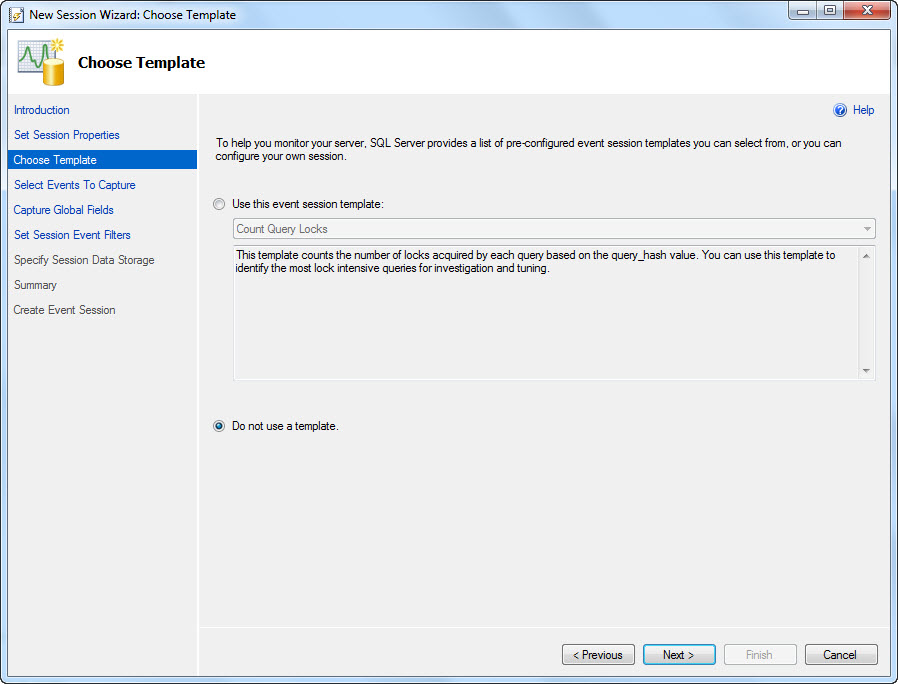
SQL 2012 Extended Event Wizard Question

I'm having a bit of trouble figuring out how to translate my 2008 R2 Extended Events into the GUI for 2012. Most of it seems pretty straight forward, but I'm having an issue how to put the values from the WHERE clause into the GUI.

Here is my query (which works in 2012, if I simply execute it)

IF EXISTS(SELECT * FROM sys.server_event_sessions WHERE name='MonitorExpensiveQuery') 
 DROP EVENT SESSION MonitorExpensiveQuery ON SERVER 
GO 
--Creating a Extended Event session with CREATE EVENT SESSION command 
CREATE EVENT SESSION MonitorExpensiveQuery ON SERVER 
ADD EVENT sqlserver.sql_statement_completed 
( 
 ACTION 
 ( 
        sqlserver.client_app_name
        ,sqlserver.client_hostname
        ,sqlserver.username
        ,sqlserver.nt_username
        ,sqlserver.session_id
        ,sqlserver.sql_text
 ) 
 WHERE (
   duration > 3000000
   OR cpu_time > 1000
   OR reads > 10000
   OR writes > 10000
  )
)
,ADD EVENT sqlserver.sp_statement_completed 
( 
 ACTION 
 ( 
        sqlserver.client_app_name
        ,sqlserver.client_hostname
        ,sqlserver.username
        ,sqlserver.nt_username
        ,sqlserver.session_id
        ,sqlserver.sql_text
 ) 
 WHERE (
   duration > 3000000
   OR cpu_time > 1000
   OR reads > 10000
   OR writes > 10000
  )
)
ADD TARGET package0.ring_buffer WITH (MAX_DISPATCH_LATENCY = 1 SECONDS, STARTUP_STATE = ON) -- The target
GO

ALTER EVENT SESSION MonitorExpensiveQuery ON SERVER STATE = START
GO

So I kick off the GUI and the first few pages seem pretty straight forward...Add my Session name:

Choose to not use a template:

Select the Events:

Select the Actions:

But when I get to the Filter page, which I am guessing is the equivalent of the "WHERE" caluse, I don't see any of my fields (duration, cpu_time, reads or writes):

So I'm unsure how to properly set this up. Any help appreciated

Tuesday, November 27, 2012

PowerShell: Find SQL Instances installed on...

I've been spending a lot of time lately learning and writing PowerShell scripts. I didn't realize how powerful these were until a recent SQL Saturday, where I sat in on a class and was amazed by all the stuff these scripts could do. Most of what I've written is based off of databases we have locally here at my work, but I've come up with a generic script that tells you all the instances of SQL Server running on a specific Windows server. You enter the server name in the $server variable on line 2 and the script executes, makes a WMI connection and returns the services installed that are for SQL Server.
cls
$server = "localhost"    #Do not put an instance here...this is just the root server

$obje = Get-WmiObject -ComputerName $server win32_service | where {($_.name -like "MSSQL$*" -or $_.name -like "MSSQLSERVER" -or $_.name -like "SQL Server (*") -and $_.name -notlike "*helper*" -and $_.name -notlike "*Launcher*"}
cls
Write-Host " "
Write-Host "Server: " $server
Write-Host " "
if ($obje -is [System.Array])
{
 for ($i=0; $i -lt $obje.Length; $i++)
 {
  $j = $i+1
  Write-Host "Instance $j ..."
  Write-Host "Service Name:  "  $obje[$i].Name
  Write-Host "Service Desc:  "  $obje[$i].DisplayName
  Write-Host "Start Mode:    "  $obje[$i].StartMode
  Write-Host "Service State: "  $obje[$i].State
  Write-Host "Service Status:" $obje[$i].Status
  Write-Host " "
 }
}else
{
 Write-Host "Service Name:  "  $obje.Name
 Write-Host "Service Desc:  "  $obje.DisplayName
 Write-Host "Start Mode:    "  $obje.StartMode
 Write-Host "Service State: "  $obje.State
 Write-Host "Service Status:" $obje.Status
}

Monday, October 1, 2012

SQL Saturday 149 Scripts and stuff

Hello everyone,

I had a great time meeting other SQL Server Professionals at SQL Saturday 149 in Minneapolis at the U of M campus, and chatting up with people afterwards at the after party. To those of you who attended my session on Execution Plans, I'd like to say thank you, I hope you took away some useful information; please feel free to email me directly with questions and please connect with me on LinkedIn. I also want to thank you for your feedback on my session; I appreciate the comments, suggestions and observations, it will help me better present in the future.

All the queries that I used in my presentation can be found here: http://ericemployed.blogspot.com/2011/11/sqlsaturday-99-scripts.html

Tuesday, August 28, 2012

SQL Saturday 149 Announcement

I found out that my submission for SQL Saturday 149 was accepted and I will again be presenting at the MN SQL Saturday this year. If you haven't signed up yet and you will be in the Twin Cities MN area on Saturday September 29th, 2012, you are missing out on one of the best SQL Server conferences around. This year, the event will be held at the University of Minnesota - Keller Hall, 200 Union Street SE, Minneapolis, MN 55455. Admittance to this event is free, but they do charge a lunch fee of 10.00 so that they can provide a lunch - not pizza! Please register soon as seating is limited, and let friends and colleages know about the event. You can find out more about this (and register!!) at the event homepage: http://www.sqlsaturday.com/149/eventhome.aspx

Monday, May 14, 2012

Extended Events with a view

So last time I wrote, I talked about my interest in Extended Events; I have been playing with them a bit since then and I came across something that made them so much easier to work with. This is not my own idea, but I wanted to share it as it blew my mind away with how simple it is, yet how I never thought of it. The idea is to take your ugly XQuery code and put it in a view, and to make it even better, create a Schema just for your Extended Events. I created a Schema called "XE" then when I want to get data from an Extended Event, I just have to type SELECT * FROM [XE]. and I let IntelliSense or SQLPrompt fill out the available options. This essentially makes querying Extended Events as easy as using a DMV. So in my last post, we created a Extended Even called "XE_Log_Shrink", If I wanted to implement this idea for this XE, I would do the following: Create the Schema (if I haven't previously done this):
USE [master]
GO
CREATE SCHEMA [XE] AUTHORIZATION [dbo]
GO
Create the View (using the XQuery from my previous post:
USE [master]
GO
SET ANSI_NULLS ON
GO
SET QUOTED_IDENTIFIER ON
GO

/************************************************************
 * AUTHOR: Eric Zierdt          *
 * CREATED: 05/08/2012          *
 * USAGE: SELECT * FROM [XE].[vw_Log_Shrink]  *
 ************************************************************/
CREATE VIEW [XE].[vw_Log_Shrink]
AS
 
WITH Data
AS (
 SELECT CAST(target_data AS XML) AS TargetData
 FROM sys.dm_xe_session_targets dt
 JOIN  sys.dm_xe_sessions ds ON ds.address = dt.event_session_address
 JOIN  sys.server_event_sessions ss ON ds.Name = ss.Name
 WHERE dt.target_name = 'ring_buffer'
  AND ds.Name = 'XE_Log_Shrink'
)
SELECT  DATEADD(hour,-5,XEventData.XEvent.value('(@timestamp)[1]', 'datetime'))  AS event_timestamp
   ,XEventData.XEvent.value('@name', 'varchar(4000)')       AS event_name
   ,DB_NAME(XEventData.XEvent.value('(data/value)[2]', 'VARCHAR(100)'))  AS DatabaseName
   ,XEventData.XEvent.value('(action/value)[2]', 'VARCHAR(512)')    AS client_hostname
   ,XEventData.XEvent.value('(action/value)[3]', 'VARCHAR(512)')    AS nt_username
   ,XEventData.XEvent.value('(action/value)[6]', 'VARCHAR(512)')    AS username
   ,XEventData.XEvent.value('(action/value)[5]', 'VARCHAR(512)')    AS sql_text
   ,XEventData.XEvent.value('(action/value)[4]', 'VARCHAR(512)')    AS session_id
   ,XEventData.XEvent.value('(action/value)[1]', 'VARCHAR(512)')    AS client_app_name
FROM Data d
CROSS APPLY TargetData.nodes('//RingBufferTarget/event') AS XEventData ( XEvent )

GO

Thats all you have to do, now you can query this like a DMV, just write:
SELECT *
FROM [XE].[vw_Log_Shrink]
WHERE [event_timestamp] > '5/8/2012'
Let me know your thoughts.

Friday, April 20, 2012

Extended Event - Check for Log Shrink and Email

I saw SQL Server MVP Jason Strate give a presentation a year or two ago on Extended Events. One situation I remember him giving was that he was having problems with a log file shrinking every so often; for some reason this caused some issues (auto-grow or something). So he used Extended Events to capture the shrink and get more details on it. This problem sounded interesting to me and I wanted to see if I could generate some code to do this from scratch, this is what I came up with:

First we need to create the Extended Event (hereafter referred to as XE) to capture the log shrink:

IF EXISTS(SELECT * FROM sys.server_event_sessions WHERE name = 'XE_Log_Shrink')
DROP EVENT SESSION XE_Log_Shrink ON SERVER
GO
CREATE EVENT SESSION XE_Log_Shrink ON SERVER -- Session Name
ADD EVENT sqlserver.databases_log_shrink -- Event we want to capture
(
ACTION -- What contents to capture
(
sqlserver.client_app_name
,sqlserver.client_hostname
,sqlserver.nt_username
,sqlserver.session_id
,sqlserver.sql_text
,sqlserver.username
)
)
ADD TARGET package0.ring_buffer WITH (MAX_DISPATCH_LATENCY = 1 SECONDS, STARTUP_STATE = ON) -- The target
GO

ALTER EVENT SESSION XE_Log_Shrink ON SERVER STATE = START


Next to check it, we need to shrink a log (I'll auto grow it again, so I can redo this numerous times if I need to)


USE [AdventureWorks]
GO
DBCC SHRINKFILE (N'AdventureWorks_Log' , 1)
GO

USE [master]
GO
ALTER DATABASE [AdventureWorks] MODIFY FILE ( NAME = N'AdventureWorks_Log', SIZE = 100MB )
GO


Lets check the XE to see if we captured the event:

;WITH Data
AS (
SELECT CAST(target_data AS XML) AS TargetData
FROM sys.dm_xe_session_targets dt
JOIN sys.dm_xe_sessions ds ON ds.address = dt.event_session_address
JOIN sys.server_event_sessions ss ON ds.Name = ss.Name
WHERE dt.target_name = 'ring_buffer'
AND ds.Name = 'XE_Log_Shrink'
)
SELECT DATEADD(hour,-5,XEventData.XEvent.value('(@timestamp)[1]', 'datetime')) AS event_timestamp
,XEventData.XEvent.value('@name', 'varchar(4000)') AS event_name
,DB_NAME(XEventData.XEvent.value('(data/value)[2]', 'VARCHAR(100)')) AS DatabaseName
,XEventData.XEvent.value('(action/value)[2]', 'VARCHAR(512)') AS client_hostname
,XEventData.XEvent.value('(action/value)[3]', 'VARCHAR(512)') AS nt_username
,XEventData.XEvent.value('(action/value)[6]', 'VARCHAR(512)') AS username
,XEventData.XEvent.value('(action/value)[5]', 'VARCHAR(512)') AS sql_text
,XEventData.XEvent.value('(action/value)[4]', 'VARCHAR(512)') AS session_id
,XEventData.XEvent.value('(action/value)[1]', 'VARCHAR(512)') AS client_app_name
FROM Data d
CROSS APPLY TargetData.nodes('//RingBufferTarget/event') AS XEventData ( XEvent )


So, we should see the event now. But lets take it a step further, lets say we want to get emailed when it happens. I've created this stored proc which will check once an hour (this is a variable, you can configure it as you see fit, but keep it under 2 hours or else you'll have to modify my waitfor logic...or you could remove the waitfor logic and just run it from the scheduler in the agent job you setup, just match up the @How_Often variable with how often your job fires)

USE master
SET ANSI_NULLS ON
GO
SET QUOTED_IDENTIFIER ON
GO
-- ===========================================================
-- Author: Eric Zierdt
-- Create date: 4/19/2012
-- Description: Checks for Log Shrinkage and sends email
-- URL: http://ericemployed.blogspot.com
-- Usage: exec Email_On_Log_Shrinkage 60
-- ===========================================================
ALTER PROCEDURE Email_On_Log_Shrinkage
-- Add the parameters for the stored procedure here
@How_Often INT = 60
AS
BEGIN
SET NOCOUNT ON
Start_Code:
--DECLARE @How_Often INT = 60
DECLARE @RowCount INT = 0
,@SQL VARCHAR(MAX) = ''

IF EXISTS (SELECT * FROM tempdb.dbo.sysobjects WHERE ID = OBJECT_ID(N'tempdb..#TempData'))
BEGIN
DROP TABLE #TempData
END

;WITH Data
AS (
SELECT CAST(target_data AS XML) AS TargetData
FROM sys.dm_xe_session_targets dt
JOIN sys.dm_xe_sessions ds ON ds.address = dt.event_session_address
JOIN sys.server_event_sessions ss ON ds.Name = ss.Name
WHERE dt.target_name = 'ring_buffer'
AND ds.Name = 'XE_Log_Shrink'
)
SELECT DATEADD(hour,-5,XEventData.XEvent.value('(@timestamp)[1]', 'datetime')) AS event_timestamp
,XEventData.XEvent.value('@name', 'varchar(4000)') AS event_name
,DB_NAME(XEventData.XEvent.value('(data/value)[2]', 'VARCHAR(100)')) AS DatabaseName
,XEventData.XEvent.value('(action/value)[2]', 'VARCHAR(512)') AS client_hostname
,XEventData.XEvent.value('(action/value)[3]', 'VARCHAR(512)') AS nt_username
,XEventData.XEvent.value('(action/value)[6]', 'VARCHAR(512)') AS username
,XEventData.XEvent.value('(action/value)[5]', 'VARCHAR(512)') AS sql_text
,XEventData.XEvent.value('(action/value)[4]', 'VARCHAR(512)') AS session_id
,XEventData.XEvent.value('(action/value)[1]', 'VARCHAR(512)') AS client_app_name
INTO #TempData
FROM Data d
CROSS APPLY TargetData.nodes('//RingBufferTarget/event') AS XEventData ( XEvent )
WHERE DATEADD(hour,-5,XEventData.XEvent.value('(@timestamp)[1]', 'datetime')) > DATEADD(MINUTE,-1*@How_Often,GETDATE())

SELECT @RowCount = COUNT(1) FROM #TempData
IF @RowCount > 0
BEGIN
PRINT CAST(@RowCount AS VARCHAR(10)) + ' Log Shrink records were found'
SET @SQL = '


'
DECLARE @DBName VARCHAR(120)
,@HostName VARCHAR(120)
,@TimeStamp VARCHAR(120)
,@UserName VARCHAR(120)
,@SQL_Text VARCHAR(120)
DECLARE ZCursor CURSOR FOR
(
SELECT DatabaseName
,client_hostname
,CAST(event_timestamp AS VARCHAR(120)) AS TimeStamp
,username
,sql_text
FROM #TempData
)
OPEN ZCursor
FETCH NEXT FROM ZCursor INTO @DBName,@HostName,@TimeStamp,@UserName,@SQL_Text
WHILE @@FETCH_STATUS = 0
BEGIN
SET @SQL += '


'

FETCH NEXT FROM ZCursor INTO @DBName,@HostName,@TimeStamp,@UserName,@SQL_Text
END

CLOSE ZCursor
DEALLOCATE ZCursor
SET @SQL += '
ServerDatabase NameTime StampClient HostnameUsernameSQL_Text
' + @@SERVERNAME + '' + @DBName + '' + @TimeStamp + '' + @HostName + '' + @UserName + '' + @SQL_Text + '

'
END
ELSE
PRINT 'No Shrinks in the time frame requested'

--PRINT @SQL

EXEC msdb.dbo.sp_send_dbmail
@recipients = '[Your Email Here]',
@body = @SQL,
@subject = 'Log Shrink Detected',
@profile_name = '[Your Profile Name Here]',
@body_format = 'html';

DROP TABLE #TempData

DECLARE @Delay VARCHAR(10)
--,@How_Often INT = 60
IF @How_Often < 60
SET @Delay = '00:' + RIGHT('00' + CAST(@How_Often AS VARCHAR(2)),2) + ':00'
ELSE
SET @Delay = '01:' + RIGHT('00' + CAST(@How_Often-60 AS VARCHAR(2)),2) + ':00'

WAITFOR DELAY @Delay
GOTO Start_Code
END
GO


Then the last step is to call this proc from a agent job. Iif you use the WaitFor logic, I'd still set a schedule to run every hour, just in case it fails...but the more I think about this, the more I prefer not using the WaitFor logic and just running the job every hour; but if the job fails, you won't get emailed.

--Eric

Friday, April 13, 2012

SSRS Queries

I've recently been working with SSRS and needed to write some queries to get more knowledge about what was happening on the server.

One of the first things I wanted to know was what subscriptions had run that did not succeed. This query should be run on the server that hosts your ReportServer Database. I'm running these on SQL Server 2008R2

USE [ReportServer]
--GET THE SERVER NAME
DECLARE @ServerURL VARCHAR(MAX)
SELECT TOP 1 @ServerURL =[MachineName]
FROM [dbo].Keys
WHERE [MachineName] IS NOT NULL

IF CHARINDEX('\',@ServerURL) > 0
SET @ServerURL = LEFT(@ServerURL,CHARINDEX('\',@ServerURL)-1)

SET @ServerURL = 'http://' + @ServerURL + '/Reports/Pages'

--FIND THE NON-SUCCESSFUL SUBSCRIPTIONS
;WITH AgentJobsCTE AS (
SELECT [SJ].job_id
,[SJ].name AS AgentJobName
,[SJS].[command]
,CAST(REPLACE(REPLACE(REPLACE([SJS].[command],'exec [ReportServer].dbo.AddEvent @EventType=''TimedSubscription'', @EventData=''',''),'exec ReportServer.dbo.AddEvent @EventType=''TimedSubscription'', @EventData=''',''), '''', '') AS SYSNAME) AS SubscriptionID
FROM msdb.[dbo].[sysjobs] AS SJ
JOIN msdb.[dbo].[sysjobsteps] AS SJS ON [SJ].[job_id] = [SJS].[job_id]
WHERE SJS.[command] LIKE '%TimedSubscription%'
)
SELECT O.[UserName] AS OwnerName,M.[UserName] AS ModifiedBy,C.[Name] AS ReportName,[AJ].AgentJobName,S.[SubscriptionID],S.[LastStatus],S.[LastRunTime],S.[ModifiedDate],S.[Report_OID]
,@ServerURL + '/SubscriptionProperties.aspx?ItemPath=' + REPLACE(REPLACE(C.Path,'/','%2f'),' ','+') + '&IsDataDriven=False&SubscriptionID=' + CAST(S.[SubscriptionID] AS VARCHAR(MAX)) AS SubscriptionURL
,@ServerURL + '/Report.aspx?ItemPath=' + REPLACE(REPLACE(C.Path,'/','%2f'),' ','+') + '&SelectedTabId=PropertiesTab&SelectedSubTabId=SubscriptionsTab&SortBy=LastExecuted&IsAscending=false' AS ReportURL
FROM [ReportServer].[dbo].[Subscriptions] AS S
JOIN [ReportServer].[dbo].[Users] AS O ON [S].[OwnerID] = [O].[UserID]
JOIN [ReportServer].[dbo].[Users] AS M ON S.[ModifiedByID] = [M].[UserID]
JOIN [ReportServer].[dbo].[Catalog] AS C ON [S].[Report_OID] = [C].[ItemID]
LEFT JOIN [AgentJobsCTE] AJ ON CAST(S.[SubscriptionID] AS SYSNAME) = AJ.[SubscriptionID]
WHERE [LastRunTime] >= '04/02/2012 15:00' --NOT NEEDED, BUT MAKES YOUR LIST SHORTER
AND [LastStatus] NOT LIKE 'Mail sent to%'
AND [LastStatus] NOT LIKE 'The file "%'
--AND [LastStatus] NOT LIKE 'Pending%' --Pending are currently running.
ORDER BY [LastRunTime] DESC


I noticed that I was seeing a number of subscriptions currently running for the same report, many run at the same time. I wrote a query to tell me which subscriptions had the same "report parameter values". This doesn't look at the subscription start time or days of the week, just the parameters...so you'll need to do some investigation (the next query will help with that)
USE [ReportServer]
DECLARE @ServerURL VARCHAR(MAX)
SELECT TOP 1 @ServerURL =[MachineName]
FROM [dbo].Keys
WHERE [MachineName] IS NOT NULL

IF CHARINDEX('\',@ServerURL) > 0
SET @ServerURL = LEFT(@ServerURL,CHARINDEX('\',@ServerURL)-1)

SET @ServerURL = 'http://' + @ServerURL + '/Reports/Pages'

;WITH DuplicateSubscriptions AS (
SELECT C.Name AS ReportName
,CAST(Parameters AS VARCHAR(MAX)) AS Parameters
,[Report_OID]
,C.Path
,COUNT(1) AS [Count]
FROM [ReportServer].[dbo].[Subscriptions] S
JOIN [ReportServer].[dbo].[Catalog] AS C ON [S].[Report_OID] = [C].[ItemID]
LEFT JOIN [dbo].[ReportSchedule] AS RS ON [S].[SubscriptionID] = [RS].[SubscriptionID]
LEFT JOIN [dbo].[Schedule] AS SC ON RS.[ScheduleID] = SC.[ScheduleID]
WHERE (SC.EndDate IS NULL OR (SC.EndDate IS NULL AND SC.[RecurrenceType] <> 1))

GROUP BY CAST(Parameters AS VARCHAR(MAX)),[Report_OID],C.Name,C.Path
HAVING COUNT(1) > 1
)
SELECT *
,@ServerURL + '/Report.aspx?ItemPath=' + REPLACE(REPLACE(Path,'/','%2f'),' ','+') + '&SelectedTabId=PropertiesTab&SelectedSubTabId=SubscriptionsTab&SortBy=LastExecuted&IsAscending=false' AS URL
FROM [DuplicateSubscriptions]
--ORDER BY [ReportName], [Count] DESC
ORDER BY [Count] DESC, [ReportName]


So when you find a possible duplicate subscription in the previous list, get the Report_OID and Parameters field and past them into the variables in this query and execute to see if it needs more investigation. I usually look at the "LastRun" field and see if there are any duplicates in that list. If you need to dig in more, the query provides links to both the subscription webpage and the report management page listing all subscriptions
USE [ReportServer]
-- VIEW ALL (NON EXPIRED) SUBSCRIPTIONS FOR A SPECIFIC REPORT WITH SPECIFIC PARAMETERS
DECLARE @ServerSubscriptionURL VARCHAR(MAX)
SELECT TOP 1 @ServerSubscriptionURL =[MachineName]
FROM [dbo].Keys
WHERE [MachineName] IS NOT NULL

IF CHARINDEX('\',@ServerSubscriptionURL) > 0
SET @ServerSubscriptionURL = LEFT(@ServerSubscriptionURL,CHARINDEX('\',@ServerSubscriptionURL)-1)

SET @ServerSubscriptionURL = 'http://' + @ServerSubscriptionURL + '/Reports/Pages'

DECLARE @ReportID sysname = 'F9999999-888G-7H77-I9I9-000000J00000' -- ReportID from previous query
,@ParameterList VARCHAR(MAX) = '[parameters]'-- Parameters from previous query

SELECT C.Name AS ReportName
,S.[SubscriptionID]
,S.[Description] Descr
,S.[LastRunTime] LastRun
,S.[LastStatus]
--,SC.[EndDate]
--,SC.[RecurrenceType]
,U.[UserName] AS Owner
,@ServerSubscriptionURL + '/SubscriptionProperties.aspx?ItemPath=' + REPLACE(REPLACE(C.Path,'/','%2f'),' ','+') + '&IsDataDriven=False&SubscriptionID=' + CAST(S.[SubscriptionID] AS VARCHAR(MAX)) AS SubscriptionURL
,@ServerSubscriptionURL + '/Report.aspx?ItemPath=' + REPLACE(REPLACE(C.Path,'/','%2f'),' ','+') + '&SelectedTabId=PropertiesTab&SelectedSubTabId=SubscriptionsTab&SortBy=LastExecuted&IsAscending=false' AS ReportURL
FROM [ReportServer].[dbo].[Subscriptions] S
JOIN [ReportServer].[dbo].[Users] AS U ON [S].[OwnerID] = [U].[UserID]
JOIN [ReportServer].[dbo].[Catalog] AS C ON [S].[Report_OID] = [C].[ItemID]
LEFT JOIN [dbo].[ReportSchedule] AS RS ON [S].[SubscriptionID] = [RS].[SubscriptionID]
LEFT JOIN [dbo].[Schedule] AS SC ON RS.[ScheduleID] = SC.[ScheduleID]
WHERE Report_OID = @ReportID
AND CAST(S.Parameters AS VARCHAR(MAX)) = @ParameterList
AND (SC.EndDate IS NULL OR (SC.EndDate IS NULL AND SC.[RecurrenceType] <> 1))
ORDER BY S.Description


But wait, thats not all, some additional interesting queries:
See all currently running reports
SELECT [JobID],[StartDate],[ComputerName],[RequestName],[RequestPath]
,[Description],[Timeout] AS Timeout, DATEDIFF(ss, startdate, GETDATE()) AS SecondsSinceRun
, DATEDIFF(mi, startdate, GETDATE()) AS MinutesSinceRun
,[JobAction],[JobType],[JobStatus]
,'http://[reporturl]/Reports/Pages/Report.aspx?ItemPath=' + REPLACE(REPLACE(RJ.RequestPath,'/','%2f'),' ','+') + '&SelectedTabId=PropertiesTab&SelectedSubTabId=SubscriptionsTab&SortBy=LastExecuted&IsAscending=false' AS ReportURL
FROM [ReportServer].[dbo].[RunningJobs] AS RJ


See the run information for a specific report (comment out the RequestType if you want to see things other than subscriptions)
SELECT *
FROM [ReportServer].[dbo].[ExecutionLog2] AS EL
WHERE [ReportPath] LIKE '%[report name=""]' AND [RequestType] = 'Subscription'
ORDER BY [TimeStart] DESC


View a schedule for a specific Subscription
-- VIEW SCHDULE DATA FOR A SPEICIFC SUBSCRIPTION
SELECT *
FROM [dbo].[Schedule] AS S
JOIN [dbo].[ReportSchedule] AS RS ON [S].[ScheduleID] = [RS].[ScheduleID]
WHERE RS.[SubscriptionID] = '[subscriptionid]'


Ok, one last one, this lets you see all expired (past the end date) and one time subscriptions (useful if you want to clean them up)

-- EXPIRED AND ONE TIME RUN SUBSCRIPTIONS

DECLARE @ServerURL VARCHAR(MAX)
SELECT TOP 1 @ServerURL =[MachineName]
FROM [dbo].Keys
WHERE [MachineName] IS NOT NULL

IF CHARINDEX('\',@ServerURL) > 0
SET @ServerURL = LEFT(@ServerURL,CHARINDEX('\',@ServerURL)-1)

SET @ServerURL = 'http://' + @ServerURL + '/Reports/Pages'

;WITH ExpiredSubscriptions AS
(
SELECT RS.[SubscriptionID], S.[EndDate]
FROM [dbo].[Schedule] AS S
JOIN [dbo].[ReportSchedule] AS RS ON [S].[ScheduleID] = [RS].[ScheduleID]
WHERE S.[EndDate] < GETDATE() OR S.[RecurrenceType] = 1
)
SELECT S.[SubscriptionID]
,C.Name AS ReportName
,S.[Description] Descr
,S.[LastRunTime] LastRun
,ES.[EndDate]
,S.[LastStatus]
,U.[UserName] AS Owner
,@ServerURL + '/SubscriptionProperties.aspx?ItemPath=' + REPLACE(REPLACE(Path,'/','%2f'),' ','+') + '&IsDataDriven=False&SubscriptionID=' + CAST(S.[SubscriptionID] AS VARCHAR(MAX)) AS SubscriptionURL
,@ServerURL + '/Report.aspx?ItemPath=' + REPLACE(REPLACE(Path,'/','%2f'),' ','+') + '&SelectedTabId=PropertiesTab&SelectedSubTabId=SubscriptionsTab&SortBy=LastExecuted&IsAscending=false' AS ReportURL
FROM Subscriptions S
JOIN [dbo].[Users] AS U ON [S].[OwnerID] = [U].[UserID]
JOIN [ReportServer].[dbo].[Catalog] AS C ON [S].[Report_OID] = [C].[ItemID]
JOIN [ExpiredSubscriptions] ES ON S.[SubscriptionID] = ES.[SubscriptionID]
ORDER BY C.[Name], ES.[EndDate] DESC


If you have any other good queries, please drop them in a comment below

Sunday, April 8, 2012

MinneBar

Thanks to everyone who came out to see my presentation at MinneBar, it was a lot of fun meeting so many talented and energetic people.

Remember you can connect with me on Twitter: @EricZierdt or via the email address I gave out at the presentation, or my linked in Profile: http://www.linkedin.com/in/ericzierdt

Wednesday, January 25, 2012

New Job

Hello to anyone who follows my blog; I know I don't post on regular intervals, but I was in Job Search mode for the past few months and just started a new position last week! So it may take me some time to get back into writing posts, but I'll try to come up with something cool to post on soon.