Showing posts with label SQL. Show all posts

Tuesday, October 13, 2015

Statistic Repository

I have seen posts from many great SQL masters saying that the first thing they do when diagnosing a performance problem is to update the stats or review the stats; I too have seen the power of updated stats, so when an internal customer of mine was having some issues with stats, it became helpful for me to create a Stats Repository to track and monitor changes in statistics.

The idea is, record once a day the stats info on each statistic in a given database, this can be done across servers (Prod, Test, Dev, etc) if you want to compare to see why something runs better on one server and not on another.

The first step is to create a holding table, if you have a DBA database to store maintenance stuff, put it there, but for this post I'll use master:

------------------------------------------------------
-- SETUP STORAGE TABLE TO STORE DAILY STATS DETAILS --
------------------------------------------------------
USE [master]
GO

/****** Object:  Table [dbo].[StatsHistory]  ******/
SET ANSI_NULLS ON
GO

SET QUOTED_IDENTIFIER ON
GO

SET ANSI_PADDING ON
GO

CREATE TABLE [dbo].[StatsHistory](
 [ServerName] [sysname] NULL,
 [DatabaseName] [sysname] NULL,
 [TableName] [sysname] NULL,
 [StatName] [sysname] NOT NULL,
 [Updated] [datetime] NULL,
 [TableRows] [int] NULL,
 [RowsSampled] [int] NULL,
 [PercentSampled] [float] NULL,
 [Steps] [int] NULL,
 [Density] [int] NULL,
 [AverageKeyLength] [int] NULL,
 [StringIndex] [varchar](3) NULL,
 [FilterExpression] [varchar](512) NULL,
 [UnfilteredRows] [int] NULL,
 [StatColumns] [varchar](500) NULL,
 [BatchRunID] [int] NULL,
 [CreateDate] [datetime] NULL
) ON [PRIMARY]
The next step is to create a function that will be used to concatenate the columns for the Stat into a list. Because of how sys.stats_columns works, you'll need to put this in every database you want to monitor

-----------------------------------------------------
-- NEEDS TO BE RUN FOR EVERY DB YOU ARE MONITORING --
--     THIS FUNCTION CREATES A LIST OF COLUMNS     --
--       INCLUDED IN THE PASSED IN STATISTIC       --
-----------------------------------------------------

USE []
GO

/****** Object:  UserDefinedFunction [dbo].[StatColumnIDToList]    Script Date: 12/19/2014 10:11:01 ******/
SET ANSI_NULLS ON
GO

SET QUOTED_IDENTIFIER ON
GO

-- =============================================
-- Author:  Eric Zierdt
-- Create date: 12/9/2014
-- Description: Converts the ColumnIDs to a List
-- USE: SELECT dbo.StatColumnIDToList(357576312,2)
-- =============================================
CREATE FUNCTION [dbo].[StatColumnIDToList] 
(
 -- Add the parameters for the function here
 @ObjectID INT
 ,@StatsID INT
)
RETURNS VARCHAR(2000)
AS
BEGIN
 -- Declare the return variable here
 DECLARE @List VARCHAR(2000)

 SELECT @List = COALESCE(@List + ',', '') + Cast(SC.column_id As varchar(5))
 FROM sys.stats_columns SC 
 WHERE SC.object_id = @ObjectID AND SC.stats_id = @StatsID

 -- Return the result of the function
 RETURN @List

END
The next step is to create a job which you will schedule to run daily. This job should execute the following code to generate the stat info and insert it into the table we made in step 1:

-- =================================================
-- Author:  Eric Zierdt
-- Create date: 12/9/2014
-- Description: INSERTS STATS DATA INTO REPOSITORY
-- =================================================
DECLARE @ServerName VARCHAR(120)
  ,@DBName VARCHAR(120)
  ,@TableName VARCHAR(120)
  ,@StatName VARCHAR(120)
  ,@SQL VARCHAR(MAX)
  ,@BatchRunID INT
  ,@ColumnList VARCHAR(2000)
  
SELECT @BatchRunID = MAX(BatchRunID)+1
FROM master.dbo.StatsHistory
  

CREATE TABLE #StatsTable (
 ServerName SYSNAME NULL
 ,DatabaseName SYSNAME NULL
 ,TableName SYSNAME NULL
 ,StatName SYSNAME
 ,Updated DATETIME
 ,TableRows INT
 ,RowsSampled INT
 ,PercentSampled AS CAST(RowsSampled AS FLOAT)/CAST(TableRows AS FLOAT)*100 
 ,Steps INT
 ,Density INT
 ,AverageKeyLength INT
 ,StringIndex VARCHAR(3)
 ,FilterExpression VARCHAR(512)
 ,UnfilteredRows INT
 ,StatColumns VARCHAR(500)
 ,BatchRunID INT
 ,CreateDate DATETIME
)

CREATE NONCLUSTERED INDEX [IDX_StatTable_Name] ON #StatsTable
(
 [TableName] ASC
) WITH (PAD_INDEX = OFF, STATISTICS_NORECOMPUTE = OFF, SORT_IN_TEMPDB = OFF, DROP_EXISTING = OFF, ONLINE = OFF
  , ALLOW_ROW_LOCKS = ON, ALLOW_PAGE_LOCKS = ON) ON [Primary]

DECLARE ZCursor CURSOR LOCAL FAST_FORWARD FOR
(
    SELECT  @@SERVERNAME AS ServerName, DB_NAME() AS DBName, OBJECT_NAME(object_id) AS TableName 
           ,name AS StatName, dbo.StatColumnIDToList(object_id,stats_id)
    FROM    sys.stats
    WHERE   OBJECT_NAME(object_id) NOT LIKE ''sys%''
            AND OBJECT_NAME(object_id) NOT LIKE ''MS%''
            AND OBJECT_NAME(object_id) NOT LIKE ''queue%'' 
            AND OBJECT_NAME(object_id) NOT LIKE ''filestream%'' 
            --AND OBJECT_NAME(object_id) = ''MSdistribution_agents''
)
OPEN ZCursor 
FETCH NEXT FROM ZCursor INTO @ServerName, @DBName, @TableName,@StatName,@ColumnList
 WHILE @@FETCH_STATUS = 0
 BEGIN
  --PRINT @StatName
  SET @SQL = ''DBCC SHOW_STATISTICS ('' + @TableName+ '',"'' + @StatName +''") WITH STAT_HEADER,NO_INFOMSGS ;''
  --PRINT @SQL
  INSERT INTO #StatsTable
  (
   StatName
   ,Updated
   ,TableRows
   ,RowsSampled
   ,Steps
   ,Density
   ,AverageKeyLength
   ,StringIndex
   ,FilterExpression
   ,UnfilteredRows
  )
  EXEC(@SQL)

  UPDATE #StatsTable
  SET TableName = @TableName
   ,DatabaseName = @DBName
   ,ServerName = @ServerName
   ,BatchRunID = @BatchRunID
   ,StatColumns = @ColumnList
   ,CreateDate = GETDATE()
  WHERE TableName IS NULL

  FETCH NEXT FROM ZCursor INTO @ServerName, @DBName, @TableName,@StatName,@ColumnList
 END

CLOSE ZCursor
DEALLOCATE ZCursor

--SELECT * FROM #StatsTable WHERE TableRows <> RowsSampled ORDER BY TableName

INSERT INTO master.dbo.StatsHistory
(
 ServerName
 ,DatabaseName
 ,TableName
 ,StatName
 ,Updated
 ,TableRows
 ,RowsSampled
 ,PercentSampled
 ,Steps
 ,Density
 ,AverageKeyLength
 ,StringIndex
 ,FilterExpression
 ,UnfilteredRows
 ,StatColumns
 ,BatchRunID
 ,CreateDate 
)
SELECT ServerName
  ,DatabaseName
  ,TableName
  ,StatName
  ,Updated
  ,TableRows
  ,RowsSampled
  ,PercentSampled
  ,Steps
  ,Density
  ,AverageKeyLength
  ,StringIndex
  ,FilterExpression
  ,UnfilteredRows
  ,StatColumns
  ,BatchRunID
  ,CreateDate 
FROM #StatsTable

DROP TABLE #StatsTable
Now you can do some fun things with your repository table, like this:

-- =====================================================
-- Author:  Eric Zierdt
-- Create date: 12/9/2014
-- Description: SAMPLE CODE TO QUERY STATS REPOSITORY
-- =====================================================
DECLARE @BatchRunID INT
SELECT  @BatchRunID = MAX(BatchRunID) FROM master.dbo.StatsHistory

/**  SEE ALL STATS **/
SELECT  *
FROM    master.dbo.StatsHistory
WHERE BatchRunID = @BatchRunID

/**  SEE ALL STATS OLDER THAN 1 MONTH  **/
SELECT  *
FROM    master.dbo.StatsHistory
WHERE BatchRunID = @BatchRunID
  AND Updated < DATEADD(MONTH,-1,GETDATE())

/**  SEE ALL NON-FULLSCAN STATS  **/
SELECT  *
FROM    master.dbo.StatsHistory
WHERE BatchRunID = @BatchRunID
  AND PercentSampled < 100


/**  CREATE UPDATE STAT SCRIPT FOR ALL NON-FULLSCAN STATS  **/
SELECT  TableName, StatName, TableRows, PercentSampled, 'UPDATE STATISTICS dbo.' + TableName + ' ' + StatName + ' WITH FULLSCAN --' + CAST(TableRows AS VARCHAR(10)) AS SQLCode
FROM    master.dbo.StatsHistory
WHERE   BatchRunID = @BatchRunID
  AND PercentSampled < 100

Wednesday, April 24, 2013

SQL Saturday 175 is this weekend!

I'm pretty excited about the SQL Saturday in Fargo this weekend. I've spent a lot of time polishing my presentation on Table Partitioning and getting it all ready for this event. I'm looking forward to spending some time with several SQL Friends, and hopefully meeting some cool SQL people from the Fargo area. All-in-all, this should be a fantastic weekend.

Friday, April 20, 2012

Extended Event - Check for Log Shrink and Email

I saw SQL Server MVP Jason Strate give a presentation a year or two ago on Extended Events. One situation I remember him giving was that he was having problems with a log file shrinking every so often; for some reason this caused some issues (auto-grow or something). So he used Extended Events to capture the shrink and get more details on it. This problem sounded interesting to me and I wanted to see if I could generate some code to do this from scratch, this is what I came up with:

First we need to create the Extended Event (hereafter referred to as XE) to capture the log shrink:

IF EXISTS(SELECT * FROM sys.server_event_sessions WHERE name = 'XE_Log_Shrink')
DROP EVENT SESSION XE_Log_Shrink ON SERVER
GO
CREATE EVENT SESSION XE_Log_Shrink ON SERVER -- Session Name
ADD EVENT sqlserver.databases_log_shrink -- Event we want to capture
(
ACTION -- What contents to capture
(
sqlserver.client_app_name
,sqlserver.client_hostname
,sqlserver.nt_username
,sqlserver.session_id
,sqlserver.sql_text
,sqlserver.username
)
)
ADD TARGET package0.ring_buffer WITH (MAX_DISPATCH_LATENCY = 1 SECONDS, STARTUP_STATE = ON) -- The target
GO

ALTER EVENT SESSION XE_Log_Shrink ON SERVER STATE = START


Next to check it, we need to shrink a log (I'll auto grow it again, so I can redo this numerous times if I need to)


USE [AdventureWorks]
GO
DBCC SHRINKFILE (N'AdventureWorks_Log' , 1)
GO

USE [master]
GO
ALTER DATABASE [AdventureWorks] MODIFY FILE ( NAME = N'AdventureWorks_Log', SIZE = 100MB )
GO


Lets check the XE to see if we captured the event:

;WITH Data
AS (
SELECT CAST(target_data AS XML) AS TargetData
FROM sys.dm_xe_session_targets dt
JOIN sys.dm_xe_sessions ds ON ds.address = dt.event_session_address
JOIN sys.server_event_sessions ss ON ds.Name = ss.Name
WHERE dt.target_name = 'ring_buffer'
AND ds.Name = 'XE_Log_Shrink'
)
SELECT DATEADD(hour,-5,XEventData.XEvent.value('(@timestamp)[1]', 'datetime')) AS event_timestamp
,XEventData.XEvent.value('@name', 'varchar(4000)') AS event_name
,DB_NAME(XEventData.XEvent.value('(data/value)[2]', 'VARCHAR(100)')) AS DatabaseName
,XEventData.XEvent.value('(action/value)[2]', 'VARCHAR(512)') AS client_hostname
,XEventData.XEvent.value('(action/value)[3]', 'VARCHAR(512)') AS nt_username
,XEventData.XEvent.value('(action/value)[6]', 'VARCHAR(512)') AS username
,XEventData.XEvent.value('(action/value)[5]', 'VARCHAR(512)') AS sql_text
,XEventData.XEvent.value('(action/value)[4]', 'VARCHAR(512)') AS session_id
,XEventData.XEvent.value('(action/value)[1]', 'VARCHAR(512)') AS client_app_name
FROM Data d
CROSS APPLY TargetData.nodes('//RingBufferTarget/event') AS XEventData ( XEvent )


So, we should see the event now. But lets take it a step further, lets say we want to get emailed when it happens. I've created this stored proc which will check once an hour (this is a variable, you can configure it as you see fit, but keep it under 2 hours or else you'll have to modify my waitfor logic...or you could remove the waitfor logic and just run it from the scheduler in the agent job you setup, just match up the @How_Often variable with how often your job fires)

USE master
SET ANSI_NULLS ON
GO
SET QUOTED_IDENTIFIER ON
GO
-- ===========================================================
-- Author: Eric Zierdt
-- Create date: 4/19/2012
-- Description: Checks for Log Shrinkage and sends email
-- URL: http://ericemployed.blogspot.com
-- Usage: exec Email_On_Log_Shrinkage 60
-- ===========================================================
ALTER PROCEDURE Email_On_Log_Shrinkage
-- Add the parameters for the stored procedure here
@How_Often INT = 60
AS
BEGIN
SET NOCOUNT ON
Start_Code:
--DECLARE @How_Often INT = 60
DECLARE @RowCount INT = 0
,@SQL VARCHAR(MAX) = ''

IF EXISTS (SELECT * FROM tempdb.dbo.sysobjects WHERE ID = OBJECT_ID(N'tempdb..#TempData'))
BEGIN
DROP TABLE #TempData
END

;WITH Data
AS (
SELECT CAST(target_data AS XML) AS TargetData
FROM sys.dm_xe_session_targets dt
JOIN sys.dm_xe_sessions ds ON ds.address = dt.event_session_address
JOIN sys.server_event_sessions ss ON ds.Name = ss.Name
WHERE dt.target_name = 'ring_buffer'
AND ds.Name = 'XE_Log_Shrink'
)
SELECT DATEADD(hour,-5,XEventData.XEvent.value('(@timestamp)[1]', 'datetime')) AS event_timestamp
,XEventData.XEvent.value('@name', 'varchar(4000)') AS event_name
,DB_NAME(XEventData.XEvent.value('(data/value)[2]', 'VARCHAR(100)')) AS DatabaseName
,XEventData.XEvent.value('(action/value)[2]', 'VARCHAR(512)') AS client_hostname
,XEventData.XEvent.value('(action/value)[3]', 'VARCHAR(512)') AS nt_username
,XEventData.XEvent.value('(action/value)[6]', 'VARCHAR(512)') AS username
,XEventData.XEvent.value('(action/value)[5]', 'VARCHAR(512)') AS sql_text
,XEventData.XEvent.value('(action/value)[4]', 'VARCHAR(512)') AS session_id
,XEventData.XEvent.value('(action/value)[1]', 'VARCHAR(512)') AS client_app_name
INTO #TempData
FROM Data d
CROSS APPLY TargetData.nodes('//RingBufferTarget/event') AS XEventData ( XEvent )
WHERE DATEADD(hour,-5,XEventData.XEvent.value('(@timestamp)[1]', 'datetime')) > DATEADD(MINUTE,-1*@How_Often,GETDATE())

SELECT @RowCount = COUNT(1) FROM #TempData
IF @RowCount > 0
BEGIN
PRINT CAST(@RowCount AS VARCHAR(10)) + ' Log Shrink records were found'
SET @SQL = '


'
DECLARE @DBName VARCHAR(120)
,@HostName VARCHAR(120)
,@TimeStamp VARCHAR(120)
,@UserName VARCHAR(120)
,@SQL_Text VARCHAR(120)
DECLARE ZCursor CURSOR FOR
(
SELECT DatabaseName
,client_hostname
,CAST(event_timestamp AS VARCHAR(120)) AS TimeStamp
,username
,sql_text
FROM #TempData
)
OPEN ZCursor
FETCH NEXT FROM ZCursor INTO @DBName,@HostName,@TimeStamp,@UserName,@SQL_Text
WHILE @@FETCH_STATUS = 0
BEGIN
SET @SQL += '


'

FETCH NEXT FROM ZCursor INTO @DBName,@HostName,@TimeStamp,@UserName,@SQL_Text
END

CLOSE ZCursor
DEALLOCATE ZCursor
SET @SQL += '
ServerDatabase NameTime StampClient HostnameUsernameSQL_Text
' + @@SERVERNAME + '' + @DBName + '' + @TimeStamp + '' + @HostName + '' + @UserName + '' + @SQL_Text + '

'
END
ELSE
PRINT 'No Shrinks in the time frame requested'

--PRINT @SQL

EXEC msdb.dbo.sp_send_dbmail
@recipients = '[Your Email Here]',
@body = @SQL,
@subject = 'Log Shrink Detected',
@profile_name = '[Your Profile Name Here]',
@body_format = 'html';

DROP TABLE #TempData

DECLARE @Delay VARCHAR(10)
--,@How_Often INT = 60
IF @How_Often < 60
SET @Delay = '00:' + RIGHT('00' + CAST(@How_Often AS VARCHAR(2)),2) + ':00'
ELSE
SET @Delay = '01:' + RIGHT('00' + CAST(@How_Often-60 AS VARCHAR(2)),2) + ':00'

WAITFOR DELAY @Delay
GOTO Start_Code
END
GO


Then the last step is to call this proc from a agent job. Iif you use the WaitFor logic, I'd still set a schedule to run every hour, just in case it fails...but the more I think about this, the more I prefer not using the WaitFor logic and just running the job every hour; but if the job fails, you won't get emailed.

--Eric

Saturday, November 12, 2011

SQLSaturday #99 Scripts

Hello to everyone who finds my blog because of taking my SQLSaturday presentation on Execution Plans. As promised, I'm attaching my scripts.

What are Execution Plans?
The definition I used in my presentation was:
"In simplest terms, Execution Plans are the steps that SQL Server takes in order to return the requested information."


How do I see Execution Plans
For Graphical Execution Plans there are a few ways:
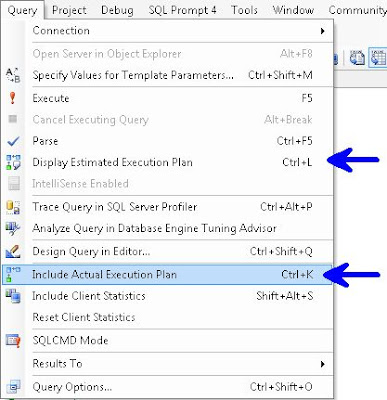
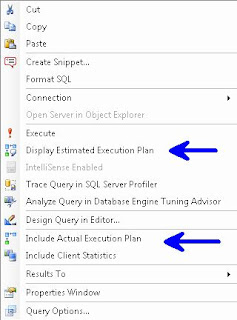
In the Menu Bar choose Query and you can choose either Display Estimated Execution Plan or Include Actual Execution Plan.


Right Click Query Window


Control L (Estimated) / M (Actual)


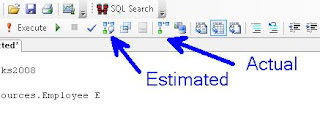
Or the simplest way, use the two buttons


Plan Type
Graphical, Text, XML
Gets more difficult to read as you go from left to right, but also get more info. i.e. Graphical is easier to read than is Text, which is easier to read than XML, but XML gives more info than Text, which in turn gives more info than Graphical.
Note: I've read that Microsoft is planning on deprecating Text Execution Plan


Permission
sysadmin, dbcreator or db_owner, or be granted the ShowPlan permission:
GRANT SHOWPLAN TO [username]


Reuse
The Optimizer stores plans so it can reuse them, this is removed on server restart or DBCC FREEPROCCACHE


The examples below use AdventureWorks and AdventureWorks2008, available at CodePlex

To start, please turn on Include Actual Execution Plan from any of the above described methods. Next run this query:


/* QUERY 1 */
USE AdventureWorks2008
SELECT *
FROM HumanResources.Employee E


In your results window, you will see a new tab called "Execution Plan", if you click on that, you should see the following. Hovering over the left most object will display the tool tip in this screenshot:
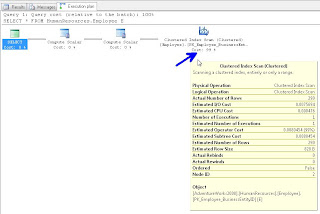


If you right click on any of the objects in this window you can choose Properties and get additional info. I traditionally read from right to left, but you can get important info like "Optimization Level" if you get the properties from the left most (select) object. The most common Optimization Levels are Trivial or Full. This is a trivial plan because there are no where clauses or joins, so the Optimizer can only get this data one way, doing a full table scan.

We discussed the difference between A Scan and a Seek. A Scan means that SQL Server needed to look at every record in the table, where as a Seek means that it can use an index to go directly to the record in question. We likened this to a phone book, if you are looking for the phone number and address for "Sam Smith", a Scan means you have to look at every page and every record even after it already finds a record for Sam Smith, whereas a Seek can go right to the S's at the top of the page and quickly go to the Sam Smith record and stop looking.

We discussed how typically, a scan performs worse than a seek. However if the table is small, and in some other instances, a Scan can be the best option.


Next we ran the following query:


/* QUERY 2 */
USE AdventureWorks
SELECT E.Title
FROM HumanResources.Employee E
WHERE E.EmployeeID = 185


And we saw an Clustered Index Seek this time.
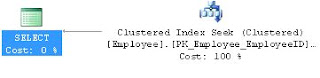


Our next query:

/* QUERY 3 */
USE AdventureWorks
SELECT MiddleName
FROM Person.Contact
WHERE Phone LIKE '11%'


Showed us the "Missing Index" at the top of the Execution Plan


You can right click on this "Missing Index" text and "Missing Index Details" to have it open the suggested index in a new window.

We altered the index slightly (gave it a name and the WITH(Data_Compression=ROW) hint) and ran this:


USE [AdventureWorks]
GO
CREATE NONCLUSTERED INDEX [Contact_IX_Phone] ON [Person].[Contact]
(
[Phone]
)
INCLUDE
(
[MiddleName]
)
WITH(Data_Compression=ROW)
GO


We then re-ran Query 3 and saw that we now have an Index Seek.


For Query 4 we ran:

/* QUERY 4 */
USE AdventureWorks
SELECT E.Title
,C.FirstName
,C.LastName
,M.FirstName AS ManagerFirstName
,M.LastName AS ManagerLastName
,E.ManagerID
FROM HumanResources.Employee E
JOIN Person.Contact C ON E.ContactID = C.ContactID
JOIN Person.Contact M ON E.ManagerID = M.ContactID
WHERE E.ManagerID = 109
AND EXISTS (
SELECT 1
FROM Person.Contact AS C2
WHERE E.ContactID = C2.ContactID
)


Which showed us a Clustered Index Scan on HumanResources.Employee
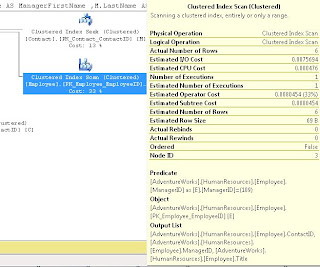


It didn't state a missing index so we discussed how to come up with our own index.

We started by noticing that ContactID and ManagerID were both being Joined, and that ManagerID was in the WHERE clause, so we created an index on that, also we used INCLUDE (Title) because Title was in the select List:


USE [AdventureWorks]
GO
CREATE NONCLUSTERED INDEX [HR-Employee_IX_EZ1] ON [HumanResources].[Employee]
(
[ContactID] ASC, [ManagerID] ASC
)
INCLUDE ( [Title])
WITH (STATISTICS_NORECOMPUTE = OFF, SORT_IN_TEMPDB = OFF, IGNORE_DUP_KEY = OFF, DROP_EXISTING = OFF, ONLINE = ON, ALLOW_ROW_LOCKS = ON, ALLOW_PAGE_LOCKS = ON, DATA_COMPRESSION=ROW) ON [PRIMARY]
GO
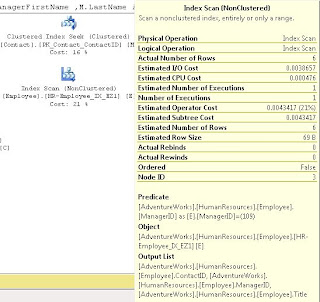

We did discuss some of the WITH parts, like the use of ONLINE = ON as a hint to try to make this index without causing any locking if possible.

After we ran this, we noted that the Index Scan still existed; we discussed that because the ContactID wasn't part of the WHERE, it should go in the INCLUDE. After making this change and re-running the index we saw it change to a Index Seek (note I'm using the DROP_EXISTING = ON here rather than the DROP statement I used in class).

USE [AdventureWorks]
GO
CREATE NONCLUSTERED INDEX [HR-Employee_IX_EZ1] ON [HumanResources].[Employee]
(
[ManagerID] ASC
)
INCLUDE ( [ContactID], [Title])
WITH (STATISTICS_NORECOMPUTE = OFF, SORT_IN_TEMPDB = OFF, IGNORE_DUP_KEY = OFF, DROP_EXISTING = ON, ONLINE = ON, ALLOW_ROW_LOCKS = ON, ALLOW_PAGE_LOCKS = ON, DATA_COMPRESSION=ROW) ON [PRIMARY]
GO


We noted that the when we hover over the Employee object in the above screen shots, that it the Estimated I/O Cost dropped from 0.0075 to 0.00386 after we converted from a SCAN to a SEEK and the Estimated Operator Cost changed from .008 to .004 We acknowledged that these numbers seem small, but if this table explodes and becomes very large, we would expect to see these go up and seeing the costs cut in half is a good thing.


For Query 5 we let the audience try to determine what was wrong and needed to be changed:


/* QUERY 5 */
USE AdventureWorks2008
SELECT SOH.AccountNumber
,S.Name AS StoreName
,SOH.OrderDate
,P.Name AS ProductName
,SOD.OrderQty
,SOD.UnitPrice
,SOD.LineTotal
FROM Sales.SalesOrderHeader SOH
JOIN Sales.SalesOrderDetail SOD ON SOH.SalesOrderID = SOD.SalesOrderID
JOIN Sales.Customer C ON SOH.CustomerID = C.CustomerID
JOIN Sales.Store S ON C.StoreID = S.BusinessEntityID
JOIN Production.Product P ON SOD.ProductID = P.ProductID


We had a big Execution Plan, we discussed that you can click on the [+] symbol at the bottom left of the window to help scroll around:
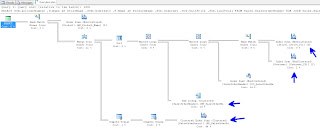

We all agreed that the Index Scan's had to go. We also introduced the "Key Lookup" object. I discussed how Key Lookups are not good, and indicate that the Optimizer couldn't get the key from the index. After looking at the query, we decided to add a number of indexes:


USE [AdventureWorks2008]
GO
CREATE NONCLUSTERED INDEX [SalesOrderHeader_I01] ON [Sales].[SalesOrderHeader]
(
[SalesOrderID] ASC,
[CustomerID] ASC
)
INCLUDE
(
AccountNumber
,OrderDate
)
WITH (STATISTICS_NORECOMPUTE = OFF, SORT_IN_TEMPDB = OFF, IGNORE_DUP_KEY = OFF, DROP_EXISTING = OFF, ONLINE = OFF
, ALLOW_ROW_LOCKS = ON, ALLOW_PAGE_LOCKS = ON, DATA_COMPRESSION = ROW) ON [PRIMARY]
GO


USE [AdventureWorks2008]
GO
/****** Object: Index [AK_SalesOrderDetail_rowguid] Script Date: 09/23/2011 14:35:47 ******/
CREATE NONCLUSTERED INDEX [SalesOrderDetail_I01] ON [Sales].[SalesOrderDetail]
(
SalesOrderID ASC
)
INCLUDE
(
ProductID
, OrderQty
,UnitPrice
,LineTotal
)
WITH (PAD_INDEX = OFF, STATISTICS_NORECOMPUTE = OFF, SORT_IN_TEMPDB = OFF, IGNORE_DUP_KEY = OFF, DROP_EXISTING = OFF
, ONLINE = OFF, ALLOW_ROW_LOCKS = ON, ALLOW_PAGE_LOCKS = ON, DATA_COMPRESSION = ROW) ON [PRIMARY]
GO


USE [AdventureWorks2008]
GO
CREATE NONCLUSTERED INDEX [Customer_I01] ON [Sales].[Customer]
(
[CustomerID] ASC)
INCLUDE (
[StoreID]
)WITH (STATISTICS_NORECOMPUTE = OFF, SORT_IN_TEMPDB = OFF, IGNORE_DUP_KEY = OFF, DROP_EXISTING = OFF, ONLINE = OFF
, ALLOW_ROW_LOCKS = ON, ALLOW_PAGE_LOCKS = ON, DATA_COMPRESSION = ROW) ON [PRIMARY]
GO


USE [AdventureWorks2008]
GO
CREATE NONCLUSTERED INDEX [Store_I01] ON [Sales].[Store]
(
[BusinessEntityID] ASC
)
INCLUDE
(
Name
)
WITH (STATISTICS_NORECOMPUTE = OFF, SORT_IN_TEMPDB = OFF, IGNORE_DUP_KEY = OFF, DROP_EXISTING = OFF, ONLINE = OFF
, ALLOW_ROW_LOCKS = ON, ALLOW_PAGE_LOCKS = ON, DATA_COMPRESSION = ROW) ON [PRIMARY]
GO


This did seem to help, when we compared the Estimated I/O's and CPU's but we still were seeing SCANS.
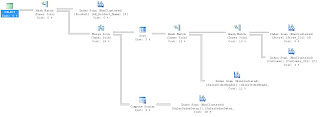


We scratched our heads and then realized that we didn't have a WHERE clause, so we were pulling every record possible. We added:

WHERE SOH.SalesOrderID = 22

and our Execution Plan looked much, much better.


By this time, I think you can figure out what needs to be done for Query 6:


/* QUERY 6 */
SELECT LineTotal, OrderQty
FROM Sales.SalesOrderDetail s
JOIN Production.Product p ON s.ProductID = p.ProductID
WHERE CarrierTrackingNumber = '4911-403C-98'


Next I showed this query which returns all the Cached plans that SQL Server has ready to go:

SELECT [cp].[refcounts]
, [cp].[usecounts]
, [cp].[objtype]
, [st].[dbid]
, [st].[objectid]
, [st].[text]
, [qp].[query_plan]
FROM sys.dm_exec_cached_plans cp
CROSS APPLY sys.dm_exec_sql_text ( cp.plan_handle ) st
CROSS APPLY sys.dm_exec_query_plan ( cp.plan_handle ) qp ;


Then we moved on to looking at Execution Plans returned as Text (Note remember to turn off "Include Actual Execution Plan"):


/* TEXT PLANS */

SET SHOWPLAN_ALL ON; --TURNS ON Estimated Exececution Plan

USE AdventureWorks2008
SELECT *
FROM HumanResources.Employee E

SET SHOWPLAN_ALL OFF; --TURNS OFF Estimated Exececution Plan


SET STATISTICS PROFILE ON --TURNS ON Actual Exececution Plan
USE AdventureWorks2008
SELECT *
FROM HumanResources.Employee E
SET STATISTICS PROFILE OFF --TURNS OFF Actual Exececution Plan


We saw a bunch of data returned



We next moved on to XML Plans:


/* XML PLANS */
SET SHOWPLAN_XML ON; --TURNS ON Estimated Exececution Plan

USE AdventureWorks2008
SELECT *
FROM HumanResources.Employee E

SET SHOWPLAN_XML OFF; --TURNS OFF Estimated Exececution Plan


SET STATISTICS XML ON --TURNS ON Actual Exececution Plan
USE [AdventureWorks]
SELECT E.Title
,C.FirstName
,C.LastName
FROM HumanResources.Employee E
JOIN Person.Contact C ON E.ContactID = C.ContactID
WHERE E.ManagerID = 185
SET STATISTICS XML OFF --TURNS OFF Actual Exececution Plan



If you click on the returned XML it will open in Graphical Format. If you really want to see it in XML, when viewing a plan in Graphical Format, right click on a blank part of the screen and choose "Show Execution Plan XML"


I had two more pretty awesome queries to show you...the first was one that finds all "Missing Indexes" for all Databases.


SELECT TOP 10 SUBSTRING(mid.statement, 2, (CHARINDEX(']',mid.statement,1)-2)) AS DBName
,mid.statement
,migs.avg_total_user_cost
,migs.avg_user_impact
,migs.user_seeks
,migs.avg_total_user_cost * (migs.avg_user_impact / 100.0)
* (migs.user_seeks + migs.user_scans) AS improvement_measure
,'CREATE INDEX [missing_index_'
+ CONVERT (VARCHAR, mig.index_group_handle) + '_'
+ CONVERT (VARCHAR, mid.index_handle) + '_'
+ LEFT(PARSENAME(mid.statement, 1), 32) + ']' + ' ON ' + mid.statement
+ ' (' + ISNULL(mid.equality_columns, '')
+ CASE WHEN mid.equality_columns IS NOT NULL
AND mid.inequality_columns IS NOT NULL THEN ','
ELSE ''
END + ISNULL(mid.inequality_columns, '') + ')' + ISNULL(' INCLUDE ('
+ mid.included_columns
+ ')', '') AS create_index_statement
,migs.*
,mid.database_id
,mid.[object_id]
FROM sys.dm_db_missing_index_groups mig
INNER JOIN sys.dm_db_missing_index_group_stats migs ON migs.group_handle = mig.index_group_handle
INNER JOIN sys.dm_db_missing_index_details mid ON mig.index_handle = mid.index_handle
WHERE migs.avg_total_user_cost * (migs.avg_user_impact / 100.0)
* (migs.user_seeks + migs.user_scans) > 1
ORDER BY migs.avg_total_user_cost * migs.avg_user_impact * (migs.user_seeks + migs.user_scans) DESC


And a query that can show you indexes which potentially are no longer used:


IF EXISTS (SELECT * FROM tempdb.dbo.sysobjects WHERE ID = OBJECT_ID(N'tempdb..#Temp_UnUsed_Indexes'))
BEGIN
DROP TABLE #Temp_UnUsed_Indexes
END

CREATE TABLE #Temp_UnUsed_Indexes
(
[Server] VARCHAR(100)
, DatabaseName VARCHAR(100)
, TableName VARCHAR(100)
, IndexName VARCHAR(100)
, is_primary_key BIT
, user_seeks INT
, user_scans INT
, user_lookups INT
, user_updates INT
, last_user_seek DATETIME
, last_user_scan DATETIME
, last_user_lookup DATETIME
, last_user_update DATETIME
, system_seeks INT
, system_scans INT
, system_lookups INT
, system_updates INT
, last_system_seek DATETIME
, last_system_scan DATETIME
, last_system_lookup DATETIME
, last_system_update DATETIME
)

SET NOCOUNT ON
DECLARE @Seeks INT = 30
,@Scans INT = 30
,@Lookups INT = 30
,@DBName VARCHAR(MAX)
,@SQL VARCHAR(MAX)

DECLARE ZCursor CURSOR FOR
SELECT NAME --select *
FROM sys.databases
WHERE owner_sid <> 0x01
AND is_read_only = 0
AND user_access = 0
ORDER BY name
OPEN ZCursor
FETCH NEXT FROM ZCursor INTO @DBName
WHILE @@FETCH_STATUS = 0
BEGIN
SET @SQL = '
USE [' + @DBName + ']
DECLARE @Seeks INT = ' + CAST(@Seeks AS VARCHAR(20)) + '
,@Scans INT = ' + CAST(@Scans AS VARCHAR(20)) + '
,@Lookups INT = ' + CAST(@Lookups AS VARCHAR(20)) + '

INSERT INTO #Temp_UnUsed_Indexes
SELECT @@SERVERNAME AS SERVER
, DB_NAME(DDIUS.database_id) AS DatabaseName
, OBJECT_NAME(DDIUS.object_id) AS TableName
, I.name AS IndexName
, I.is_primary_key AS is_primary_key
, DDIUS.user_seeks AS user_seeks
, DDIUS.user_scans AS user_scans
, DDIUS.user_lookups AS user_lookups
, DDIUS.user_updates AS user_updates
, DDIUS.last_user_seek AS last_user_seek
, DDIUS.last_user_scan AS last_user_scan
, DDIUS.last_user_lookup AS last_user_lookup
, DDIUS.last_user_update AS last_user_update
, DDIUS.system_seeks AS system_seeks
, DDIUS.system_scans AS system_scans
, DDIUS.system_lookups AS system_lookups
, DDIUS.system_updates AS system_updates
, DDIUS.last_system_seek AS last_system_seek
, DDIUS.last_system_scan AS last_system_scan
, DDIUS.last_system_lookup AS last_system_lookup
, DDIUS.last_system_update AS last_system_update
FROM sys.dm_db_index_usage_stats AS DDIUS
JOIN sys.indexes AS I ON DDIUS.index_id = I.index_id AND DDIUS.object_id = I.object_id
WHERE database_id = DB_ID()
AND user_seeks <= @Seeks AND user_scans <= @Scans AND user_lookups <= @Lookups
--AND is_primary_key = 0
ORDER BY OBJECT_NAME(DDIUS.object_id), I.name
'
EXEC(@SQL)
-- PRINT @SQL

FETCH NEXT FROM ZCursor INTO @DBName
END
CLOSE ZCursor
DEALLOCATE ZCursor


SELECT *
FROM #Temp_UnUsed_Indexes
WHERE is_primary_key = 0
--AND user_seeks = 0 AND user_scans = 0 AND user_lookups = 0
--AND system_seeks = 0 AND system_scans = 0 AND system_lookups = 0
--AND DatabaseName NOT IN ('MOBILE')
ORDER BY [SERVER]
,DatabaseName
,TableName
,is_primary_key DESC
,IndexName


Remember that the numbers returned are since the last restart or DBCC FREEPROCCACHE so if you did that recently, don't trust these too much. Look at user_seeks, user_scans and user_lookups to see how often users have called this index. As always, do your research, this is a tool to help you identify probable indexes which might be unused.


I want to really thank Grant Fritchey, who literally wrote the book on Execution Plans, check out his stuff, he knows way more than I do about it.
http://www.simple-talk.com/author/grant-fritchey/
http://www.simple-talk.com/sql/performance/execution-plan-basics/
http://Scarydba.com/Resources


Lastly, if you are not already a member of PASS or PASSMN, please signup, it's free and we have monthly meetings where we discuss stuff and show code and talk about new stuff...it's a lot of fun. Also, PASS does something called 24 hours of pass, where they do 24 hourly webinars (over 2 days), for free!!! so sign up and check them out.

Please subscribe to my blog and follow me on Twitter (@EricZierdt).

Comment, or email me any questions.

Thursday, November 10, 2011

New SP_WHO2

A long time ago, I was given a stored proc called "SP_WHOM" which said it was created by "MFrank". SP_WHOM has been a staple in my collection of utilities I use to debug issues on my SQL Servers. I never paid it much mind, until recently, when the thought occurred to me that I knew how to get all of the provided data from SP_WHOM, in an easier way, and I could add some beneficial new fields in the process. So I set out to try to design my own SP_WHOM, so I took at look at the fields provided in the DMV sys.sysprocess All the fields I wanted were in there; so I decided to design my own and this is what I came up with:


USE [master]
GO

SET ANSI_NULLS ON
GO

SET QUOTED_IDENTIFIER ON
GO

/*******************************
** Created By: Eric Zierdt **
** ericzierdt@gmail.com **
** ericemployed.blogspot.com **
*******************************/
CREATE PROCEDURE [dbo].[sp_whom]
AS

SET NOCOUNT ON

IF EXISTS (SELECT * FROM tempdb.dbo.sysobjects WHERE ID = OBJECT_ID(N'tempdb..#RawData'))
BEGIN
DROP TABLE #RawData
END

SELECT SPID
,UPPER(status) AS Status
,LogiName
,HostName
,CASE blocked
WHEN 0 THEN ''
ELSE CAST(blocked AS VARCHAR(5))
END AS BlockedBy
,Open_Tran
,DB_NAME(S.dbid) AS DBName
,CMD AS Command
,Last_Batch
,DATEDIFF(mi,last_batch,GETDATE()) AS RunTimeMins
,DATEDIFF(ss,last_batch,GETDATE()) AS RunTimeSecs
,CPU AS CPU_Time
,Physical_IO AS DiskIO
,Program_Name
,ST.text AS SQL_Text
INTO #RawData
FROM sys.sysprocesses AS S
CROSS APPLY sys.dm_exec_sql_text(S.sql_handle) ST

SELECT *
FROM #RawData R
WHERE spid <> @@SPID
AND status NOT IN ( 'background', 'sleeping' )
UNION
SELECT *
FROM #RawData AS RD
WHERE SPID IN (
SELECT BlockedBy
FROM #RawData AS RD2
WHERE RD2.BlockedBy <> ''
)
ORDER BY SPID

DROP TABLE #RawData

GO


Why are you doing a UNION you might ask? I'm doing it because I want to display only those SPIDS which are not set to "Sleeping" or "Background" status, however...if a SPID is blocked by another SPID, I'd like to display the blocking SPID as well. If I didn't do this and someone opens a transaction, updates records and doesn't close the transaction, their SPID's status will be Sleeping, so you will see that any spid trying to access the record(s) are blocked, but you won't know anything about the SPID doing the blocking.

I'd love feedback, is there something I should add to this to make it more useful? Please follow my blog and leave me some feedback.

P.s. because this is being placed in the master database and has the sp_ prefix you can call this from any database by just executing: "sp_whom" no need for exec or master.. or anything.

Friday, September 16, 2011

Deleting ZZ'd Objects

If you are like me, you have some method or process of checking that a given table/proc/etc. is safe to be dropped prior to dropping it. My current method is to do some checks, see how often stuff is being used, search code, then to rename the object ZZ_. I let the object exist for two weeks as ZZ_ before I finally script it out and drop it.

I decided to write a little script to search out the names of all my ZZ'd objects on a server (specifically User Tables, Procs and Agent Jobs) and store them in a temp table. Next I email the list to my development team offering them one last chance to save the object, and set about scripting it out. The script also creates a DROP script for you to run, so when you are ready, you can just run the script.

Works pretty well. Please comment below on how you facilitate removing old objects, is your method different from mine?


/*******************************
** Created By: Eric Zierdt **
** ericzierdt@gmail.com **
** ericemployed.blogspot.com **
*******************************/
IF object_id('tempdb..#ObjectList') IS NOT NULL
BEGIN
DROP TABLE #ObjectList
END
CREATE TABLE #ObjectList
(
DBName VARCHAR(100)
,ObjectName VARCHAR(100)
,ObjectType VARCHAR(2)
,ObjectType_Desc VARCHAR(100)
)

DECLARE @DBName AS VARCHAR(MAX)
,@SQL AS VARCHAR(MAX)

DECLARE ZCursor CURSOR FOR
SELECT name
FROM sys.databases
WHERE owner_sid <> '0x01'
ORDER BY name
OPEN ZCursor
FETCH NEXT FROM ZCursor
INTO @DBName
WHILE @@FETCH_STATUS = 0
BEGIN
PRINT 'Starting ' + @DBName
SET @SQL = 'USE [' + @DBName + ']
SELECT ''' + @DBName + ''' AS DBName, name,type,type_desc FROM sys.objects WHERE name LIKE ''%%zz%%'' ORDER BY CASE WHEN type = ''U'' THEN 1 ELSE 2 END, name
'
INSERT INTO #ObjectList
( DBName, ObjectName,ObjectType,ObjectType_Desc )
EXEC (@SQL)
FETCH NEXT FROM ZCursor
INTO @DBName
END
CLOSE ZCursor
DEALLOCATE ZCursor

USE msdb
INSERT INTO #ObjectList
( DBName, ObjectName,ObjectType,ObjectType_Desc )
SELECT 'msdb',name,'A','Agent Job'
FROM dbo.sysjobs
WHERE name LIKE '%%zz%'


-- SELECT * FROM #ObjectList

-- RUN THE CODE BELOW TO PRINT OUT THE DROP COMMANDS FOR THE OBJECTS
/*
DECLARE @DBName AS VARCHAR(MAX)
,@SQL AS VARCHAR(MAX)
,@ObjectName AS VARCHAR(MAX)
,@ObjectType AS VARCHAR(2)
,@Job_ID VARCHAR(257)
DECLARE DeleteCursor CURSOR FOR
SELECT DBName, ObjectName,ObjectType FROM #ObjectList --WHERE ObjectType = 'U'
OPEN DeleteCursor
FETCH NEXT FROM DeleteCursor
INTO @DBName,@ObjectName,@ObjectType
WHILE @@FETCH_STATUS = 0
BEGIN
IF @ObjectType = 'U'
BEGIN
SET @SQL = 'DROP TABLE [' + @DBName + '].[dbo].[' + @ObjectName + ']
GO'
END
ELSE IF @ObjectType = 'P'
BEGIN
SET @SQL = 'USE [' + @DBName + ']
DROP PROCEDURE [dbo].[' + @ObjectName + ']
GO'
END
ELSE IF @ObjectType = 'A'
BEGIN
SELECT @Job_ID = job_id FROM msdb.dbo.sysjobs_view WHERE name = N'' + @ObjectName + ''
SET @SQL = 'EXEC msdb.dbo.sp_delete_job @job_id=N''' + @Job_ID + ''', @delete_unused_schedule=1
GO'
END
ELSE
PRINT 'Unknown Object Type Found: [' + @ObjectType + ']'
PRINT @SQL
FETCH NEXT FROM DeleteCursor
INTO @DBName,@ObjectName,@ObjectType
END
CLOSE DeleteCursor
DEALLOCATE DeleteCursor
*/

Thursday, April 21, 2011

Getting Object Counts

Recently I was reporting a bug I noticed with a 3rd party tool, the support group asked me to send them "the number of instances, number of databases per instance, total number of tables and total number of indexes." Now I knew the number of instances I was monitoring, and I knew the approximate number of tables (perhaps a good DBA should know this number, not sure...do other DBA's out there with larger servers know the exact number? comment below, I'm interested), but I had no idea how many indexes. So I wrote a little script to give me this number and as I like to do, I'm making it available to the community, hope this helps you...if you find use of it (even years in the future) post below.


/***********************************
** Author: Eric Zierdt **
** Date: 4/21/2011 **
** Email: eric.zierdt@gmail.com **
***********************************/

DECLARE @CountAll AS TABLE (CntName VARCHAR(100), Cnt INT)

/*******************************************
** GET COUNT OF ALL NON-SYSTEM DATABASES **
*******************************************/
INSERT INTO @CountAll
SELECT 'TotalDBs',COUNT(1) AS TotalDBs
FROM sys.databases D
WHERE owner_sid <> '0x01'


/******************************
** GET COUNT OF ALL TABLES **
** FOR NON-SYSTEM DATABASES **
******************************/
DECLARE @CountTable AS TABLE (DB VARCHAR(100),CNT INT)
DECLARE @SQL VARCHAR(MAX)
DECLARE @DBName VARCHAR(128)
SET @DBName = ''
WHILE @DBName < (
SELECT MIN(name)
FROM sys.databases
WHERE name > @DBName
AND name NOT IN ('master','model','msdb','tempdb')
)
BEGIN
SELECT @DBName = MIN(NAME) FROM sys.databases WHERE name > @DBName AND NAME NOT IN ('master','model','msdb','tempdb')
SET @SQL = '
USE [' + @DBName + ']
SELECT ''' + @DBName + ''' AS DBName
,COUNT(1) AS Cnt
FROM sys.tables
'
INSERT INTO @CountTable
EXEC (@SQL)
END

INSERT INTO @CountAll
SELECT 'TotalTables',SUM(CNT) AS TotalTables
FROM @CountTable

/*******************************
** GET COUNT OF ALL INDEXES **
** FOR NON-SYSTEM DATABASES **
*******************************/
DECLARE @IndexTable AS TABLE (DB VARCHAR(100),TableName VARCHAR(100), CNT INT)
SET @DBName = ''
WHILE @DBName < (
SELECT MIN(name)
FROM sys.databases
WHERE name > @DBName
AND name NOT IN ('master','model','msdb','tempdb')
)
BEGIN
SELECT @DBName = MIN(NAME) FROM sys.databases WHERE name > @DBName AND NAME NOT IN ('master','model','msdb','tempdb')
SET @SQL = '
USE [' + @DBName + ']
SELECT ''' + @DBName + ''' AS DBName
,OBJECT_NAME(I.object_id) AS TableName
, COUNT(1) AS Cnt
FROM sys.indexes I
JOIN sys.tables T ON I.object_id = T.object_id
WHERE I.name IS NOT NULL
GROUP BY OBJECT_NAME(I.object_id)
'
--PRINT @SQL
INSERT INTO @IndexTable
EXEC (@SQL)
END

INSERT INTO @CountAll
SELECT 'TotalIndexes',SUM(CNT) AS TotalIndexes
FROM @IndexTable

SELECT *
FROM @CountAll

Thursday, March 31, 2011

GUIDS mess up defragmenting

I'm sure most of you know already that the use of GUIDS or UniqueIdentifiers is messy for doing defragmenting; because they are not sequential, they tend to cause problems for indexes and while you can decrease your FillFactor, I found that I'd rather not defrag an index only to find it at 99% fragmented again within a few hours.

I wrote a little script to help me identify the indexes that have an included column which is of type UniqueIdentifier.


-- CHANGE THE DB TO THE ONE YOU WANT TO SEE INDEXES WITH GUIDS IN THEM

;WITH LIST AS (
SELECT p.object_id
,OBJECT_NAME(p.object_id) AS TableName
,I.name AS IndexName
,C.Name AS ColName
,T.name AS DataType
FROM sys.partitions P
JOIN sysobjects O ON P.object_id = object_id(O.name)
JOIN sys.indexes I ON I.object_id = P.object_id AND I.index_id = P.index_id
JOIN sys.index_columns IC ON p.object_id = IC.object_id AND p.index_id = IC.index_id
JOIN sys.columns C ON P.object_id = C.object_id AND IC.column_id = C.column_id
JOIN sys.types T ON c.system_type_id = T.system_type_id
WHERE T.name = 'uniqueidentifier'
AND P.partition_number = 1
AND O.xtype='U'
)
SELECT DISTINCT *
FROM LIST
ORDER BY TableName,ColName

Thursday, January 6, 2011

Second to last Friday in Month

I was tasked with creating a SQL Agent Job that would run on the 2nd to last Friday every month; but how to do that? The 3rd Friday of every month isn't necessarily the 2nd to last Friday...The Job Scheduler has an option for "LAST" x of the month, but not 2nd to last, so after some thought I decided to write a function that would do it for me. Now, I'm happy to see any comments from people on a better way of doing this, but this is what I came up with, hope it helps you, or spawns some ideas for you.

Before you can implment the main function, you'll need to have a function that returns the first day of a given month, and the last day of a given month....Ok, you probably don't need them as functions, but I like them that way...


SET ANSI_NULLS ON
GO
SET QUOTED_IDENTIFIER ON
GO

-- =====================================================================
-- Author: Eric Zierdt: ericzierdt@gmail.com
-- Create date: 01/12/2010
-- Description: Returns the Last day of the month
-- Usage: SELECT dbo.LastOfMonth(GetDate())
-- =====================================================================
CREATE FUNCTION [dbo].[LastOfMonth]
(
-- Add the parameters for the function here
@DTC DATE -- DateToCheck
)
RETURNS DATE
AS
BEGIN
-- Declare the return variable here
DECLARE @Result DATE

-- Add the T-SQL statements to compute the return value here
SELECT @Result = CAST(DATEADD(d,-1,DATEADD(mm,DATEDIFF(m,0,@DTC)+1, 0)) AS DATE)

-- Return the result of the function
RETURN @Result

END


SET ANSI_NULLS ON
GO
SET QUOTED_IDENTIFIER ON
GO


-- =====================================================================
-- Author: Eric Zierdt: ericzierdt@gmail.com
-- Create date: 01/12/2010
-- Description: Returns the first day of the month
-- Usage: SELECT dbo.FirstOfMonth(GetDate())
-- =====================================================================
CREATE FUNCTION [dbo].[FirstOfMonth]
(
-- Add the parameters for the function here
@DTC DATE -- DateToCheck
)
RETURNS DATE
AS
BEGIN
-- Declare the return variable here
DECLARE @Result DATE

-- Add the T-SQL statements to compute the return value here
SELECT @Result = CAST(DATEADD(ms,0,DATEADD(mm,DATEDIFF(m,0,@DTC), 0)) AS DATE)

-- Return the result of the function
RETURN @Result

END


And now for the main attraction:


SET ANSI_NULLS ON
GO
SET QUOTED_IDENTIFIER ON
GO

-- =====================================================================
-- Author: Eric Zierdt: ericzierdt@gmail.com
-- Create date: 01/06/2011
-- Description: Returns the Nth last of the given month
-- Usage: SELECT dbo.NthLastDoWOfMonth(GetDate(),6,1)
-- =====================================================================
CREATE FUNCTION [dbo].[NthLastDoWOfMonth]
(
-- Add the parameters for the function here
@MonthToCheck DATE -- MonthToCheck
,@DayOfWeek INT -- 1=Sunday...7=Saturday
,@WeeksFromLast INT-- 0=Last @DayOfWeek of the month, 1=2nd to last @DayOfWeek of the month, etc.
)
RETURNS DATE
AS
BEGIN
DECLARE @DaysInMonth TABLE (DayOfMonth DATE, DayOfWeek INT)

DECLARE @FirstOfMonth DATE
,@LastOfMonth DATE
,@ThisDay DATE
,@Result DATE

SELECT @FirstOfMonth = dbo.FirstOfMonth(@MonthToCheck), @LastOfMonth = dbo.LastOfMonth(@MonthToCheck)
SET @ThisDay = @FirstOfMonth
WHILE @ThisDay <= @LastOfMonth
BEGIN
INSERT INTO @DaysInMonth
SELECT @ThisDay, DATEPART(dw,@ThisDay)
SET @ThisDay = DATEADD(d,1,@ThisDay)
END

;WITH DaysCTE AS (
SELECT DayOfMonth ,ROW_NUMBER() OVER(ORDER BY DayOfMonth) AS 'RowNumber'
FROM @DaysInMonth DIM
WHERE DayOfWeek = @DayOfWeek
)
, MaxRow AS (
SELECT MAX(RowNumber) AS MaxRowNbr
FROM DaysCTE
)
SELECT @Result = DaysCTE.DayOfMonth
FROM DaysCTE, MaxRow
WHERE DaysCTE.RowNumber = MaxRow.MaxRowNbr-@WeeksFromLast

RETURN @Result

END


For some reason I can't figure out, there seems to be a /day tag at the end of the scirpt...it's not in my code, it appears to be in the exact spot as the code stating the end of my SQL...not sure, ignore it.

Tuesday, November 2, 2010

SQLSaturday #58 Presentation

Last Friday I had the opportunity to present a track on Table and index partitioning at SQLSaturday #58 (yes, SQLSaturday on a Friday) in Minnesota.

I had a great time, met a lot of great people and found the entire experience very enjoyable; I want to present more.

I said I'd put my queries up on my blog; so here it is.

Script 1 which was here is how to create a very basic partition and add values to it and move it (create a folder on your c drive called: PartitionDB prior to starting


/**************************************
** Database Partitioning Script **
** Eric Zierdt, W3i **
** http://ericemployed.blogspot.com **
** http://blog.w3i.com **
**************************************/
USE master
GO
CREATE DATABASE PartitionDB ON
PRIMARY(NAME = db_data, FILENAME = 'c:\PartitionDB\db.mdf' ,SIZE = 25MB)
, FILEGROUP FG1( NAME = FG1_data, FILENAME = 'c:\PartitionDB\FG1.ndf' ,SIZE = 25MB)
, FILEGROUP FG2( NAME = FG2_data, FILENAME = 'c:\PartitionDB\FG2.ndf', SIZE = 25MB)
, FILEGROUP FG3( NAME = FG3_data, FILENAME = 'c:\PartitionDB\FG3.ndf', SIZE = 25MB)
, FILEGROUP FG4( NAME = FG4_data, FILENAME = 'c:\PartitionDB\FG4.ndf', SIZE = 25MB)
, FILEGROUP FG5( NAME = FG5_data, FILENAME = 'c:\PartitionDB\FG5.ndf', SIZE = 25MB)
, FILEGROUP FGDefault( NAME = FGDefault_data, FILENAME = 'c:\PartitionDB\FGDefault.ndf', SIZE = 25MB)
LOG ON( NAME = db_log, FILENAME = 'c:\PartitionDB\log.ldf', SIZE = 1MB,FILEGROWTH = 100MB ) ;
GO
USE PartitionDB
GO

CREATE PARTITION FUNCTION EZ_PartitionFunction (INT) AS
RANGE RIGHT FOR VALUES (1000, 2000, 3000, 4000, 5000);

CREATE PARTITION SCHEME EZ_PartitionScheme AS
PARTITION EZ_PartitionFunction TO([FGDefault],[FG1], [FG2], [FG3], [FG4], [FG5])
GO


CREATE TABLE EZ_PartionedTable
( ID int PRIMARY KEY,
Name VARCHAR(50)
)
ON EZ_PartitionScheme(ID)


INSERT INTO EZ_PartionedTable (ID,NAME)
VALUES (1,'Test')
,(1001,'Test')
,(2001,'Test')
,(3001,'Test')
,(4001,'Test')
,(5001,'Test')
,(6001,'Test')
,(7001,'Test')
,(8001,'Test')

USE [master]
GO
ALTER DATABASE [PartitionDB] ADD FILEGROUP [FG6]
GO
ALTER DATABASE [PartitionDB] ADD FILE ( NAME = N'FG6_data', FILENAME = N'C:\PartitionDB\FG6.ndf' , SIZE = 25MB , FILEGROWTH = 5MB )
TO FILEGROUP [FG6]
GO
USE PartitionDB
GO

-- Adding a new Scheme and Function
ALTER PARTITION SCHEME EZ_PartitionScheme NEXT USED [FG6]

ALTER PARTITION FUNCTION EZ_PartitionFunction() SPLIT RANGE (6000)


-- Removing a Scheme and Function
ALTER PARTITION FUNCTION EZ_PartitionFunction() MERGE RANGE (6000)


-- Adding a new Scheme and Function
ALTER PARTITION SCHEME EZ_PartitionScheme NEXT USED [FG6]

ALTER PARTITION FUNCTION EZ_PartitionFunction() SPLIT RANGE (6000)

-- Removing a Scheme and Function out of Sequence
ALTER PARTITION FUNCTION EZ_PartitionFunction ()MERGE RANGE (5000)


ALTER PARTITION SCHEME EZ_PartitionScheme NEXT USED [FG5]

ALTER PARTITION FUNCTION EZ_PartitionFunction() SPLIT RANGE (5000)

USE master
GO


Note that the USE Master at the bottom is so that in the next script (which I had in different files/tabs) when you drop the DB, you don't have an error about someone being connected.

Script 2 was used to demonstrate large volume of data being merged and split and how quickly the data goes from one table to another when you use the ALTER TABLE - SWITCH. When I gave the presentation, I had a subfolder created previously that had a Database with 8 Million rows already created. This wont work over the blog, so you'll need to create the table and dump in the 8M rows yourself....So I'm taking out the part about dropping the table and attaching the other database.


/**************************************
** Database Partitioning Script **
** Eric Zierdt, W3i **
** http://ericemployed.blogspot.com **
** http://blog.w3i.com **
**************************************/

/*** DROP TABLE AND PARTITION ***/
USE PartitionDB
DROP TABLE EZ_PartionedTable
DROP PARTITION SCHEME EZ_PartitionScheme
DROP PARTITION FUNCTION EZ_PartitionFunction
ALTER DATABASE [PartitionDB] REMOVE FILE [FG6_data]
GO
ALTER DATABASE [PartitionDB] REMOVE FILEGROUP [FG6]
GO

/*** CREATE NEW PARTITION FUNCTION BASED ON MILLION RECORDS ***/
CREATE PARTITION FUNCTION EZ_PartitionFunction (INT) AS
RANGE RIGHT FOR VALUES (1000000, 2000000, 3000000, 4000000, 5000000);

/*** CREATE NEW PARTITION SCHEME ***/
CREATE PARTITION SCHEME EZ_PartitionScheme AS
PARTITION EZ_PartitionFunction TO([FGDefault],[FG1], [FG2], [FG3], [FG4], [FG5])
GO

/*** CREATE NEW TABLE ***/
CREATE TABLE EZ_PartionedTable
( ID int NOT NULL IDENTITY (1000000, 1),
Name VARCHAR(50)
)
ON EZ_PartitionScheme(ID)

/*** ADD PK TO TABLE ***/
ALTER TABLE dbo.EZ_PartionedTable ADD CONSTRAINT
PK_EZ_PartionedTable PRIMARY KEY CLUSTERED
(
ID
) WITH( STATISTICS_NORECOMPUTE = OFF, IGNORE_DUP_KEY = OFF, ALLOW_ROW_LOCKS = ON, ALLOW_PAGE_LOCKS = ON) ON EZ_PartitionScheme(ID)

GO

/*** LOAD 8 MILLION RECORDS...Go get some food, this will take a while... ***/
DECLARE @i INT = 1
WHILE @i <= 8000000
BEGIN
INSERT INTO EZ_PartionedTable (NAME)
VALUES ('Test')
SET @i += 1
END


/*** ADD A NEW FILEGROUP TO THE DATABASE ***/
USE [master]
GO
ALTER DATABASE [PartitionDB] ADD FILEGROUP [FG6]
GO
ALTER DATABASE [PartitionDB] ADD FILE ( NAME = N'FG6_data', FILENAME = N'C:\PartitionDB\FG6.ndf' , SIZE = 25MB , FILEGROWTH = 5MB )
TO FILEGROUP [FG6]
GO
USE PartitionDB
GO


/*** ADD A NEW FILEGROUP TO THE PARTITION ***/
ALTER PARTITION SCHEME EZ_PartitionScheme NEXT USED [FG6]

ALTER PARTITION FUNCTION EZ_PartitionFunction() SPLIT RANGE (6000000)
--NOTE THE LOG WILL GROW SIGNIFIGANTLY (look in your data directory, the log will grow to around 1.2 GB)
--The point of this is to say, that you need to be careful when using SPLIT and MERGE..doing it to a an empty range is ok, but if the range has data, it's dangerous

/*** SHRINK LOG ***/
USE [PartitionDB]
GO
DBCC SHRINKFILE (N'db_log' , 1)
GO

/*** REMOVE FILEGROUP FROM THE PARTITION ***/
ALTER PARTITION FUNCTION EZ_PartitionFunction ()MERGE RANGE (6000000)

/*** SHRINK LOG ***/
USE [PartitionDB]
GO
DBCC SHRINKFILE (N'db_log' , 1)
GO

/*** SHRINK LOG ***/
USE [PartitionDB]
GO
DBCC SHRINKFILE (N'FG6_data' , 25)
GO

/*** CREATE STAGE TABLE FOR SWITCH ***/
CREATE TABLE EZ_PartionedTable_Stage
( ID int NOT NULL IDENTITY (1000000, 1),
Name VARCHAR(50)
)
ON EZ_PartitionScheme(ID)

ALTER TABLE dbo.EZ_PartionedTable_Stage ADD CONSTRAINT
PK_EZ_PartionedTable_Stage PRIMARY KEY CLUSTERED
(
ID
) WITH( STATISTICS_NORECOMPUTE = OFF, IGNORE_DUP_KEY = OFF, ALLOW_ROW_LOCKS = ON, ALLOW_PAGE_LOCKS = ON) ON EZ_PartitionScheme(ID)
GO

--SHOW View Table Partition Data and explain what SWITCH DOES
ALTER TABLE EZ_PartionedTable SWITCH PARTITION 6 TO EZ_PartionedTable_Stage PARTITION 6

ALTER TABLE EZ_PartionedTable_Stage SWITCH PARTITION 6 TO EZ_PartionedTable PARTITION 6

--SHOW Dropping of data and removing old file group.
ALTER TABLE EZ_PartionedTable SWITCH PARTITION 6 TO EZ_PartionedTable_Stage PARTITION 6
DROP TABLE EZ_PartionedTable_Stage

ALTER DATABASE [PartitionDB] REMOVE FILE [FG6_data]
GO
ALTER DATABASE [PartitionDB] REMOVE FILEGROUP [FG6]
GO

/*** SHRINK LOG ***/
USE [PartitionDB]
GO
DBCC SHRINKFILE (N'FG5_data' , 25)
GO

USE master
GO


Script 3 is a real life example of how my company uses Partitioning. It uses a date based range; and shows the process we use to move and drop the oldest data:


/**************************************
** Database Partitioning Script **
** Eric Zierdt, W3i **
** http://ericemployed.blogspot.com **
** http://blog.w3i.com **
**************************************/

USE master
GO
ALTER DATABASE [PartitionDB] SET SINGLE_USER WITH ROLLBACK IMMEDIATE
GO
USE [master]
GO
DROP DATABASE PartitionDB
GO

/*** CREATE DB WITH FILEGROUP NAMES THAT ARE DATE BASED - AUGUST, SEPTEMBER AND OCTOBER 2010 ***/
CREATE DATABASE PartitionDB ON
PRIMARY(NAME = db_data, FILENAME = 'c:\PartitionDB\db.mdf' ,SIZE = 4MB)
, FILEGROUP TRANDTA_201008 ( NAME = TRANDTA_201008, FILENAME = 'c:\PartitionDB\TRANDTA_201008.ndf' ,SIZE = 25MB)
, FILEGROUP TRANDTA_201009( NAME = TRANDTA_201009, FILENAME = 'c:\PartitionDB\TRANDTA_201009.ndf', SIZE = 25MB)
, FILEGROUP TRANDTA_201010( NAME = TRANDTA_201010, FILENAME = 'c:\PartitionDB\TRANDTA_201010.ndf', SIZE = 25MB)
, FILEGROUP TRANDEFAULT( NAME = TRANDEFAULT_data, FILENAME = 'c:\PartitionDB\FGDefault.ndf', SIZE = 25MB)
LOG ON( NAME = db_log, FILENAME = 'c:\PartitionDB\log.ldf', SIZE = 1MB,FILEGROWTH = 100MB ) ;
GO
USE PartitionDB
GO

/*** MAKE A PARTITION FUNCTION WITH RANGES FOR 08,09,10 2010 ***/
CREATE PARTITION FUNCTION [EZ_PartitionFunction](DATETIME) AS RANGE RIGHT FOR VALUES (
N'2010-08-01'
, N'2010-09-01'
, N'2010-10-01')
GO

/*** BIND THE SCHEME TO THE FUNCTION ***/
CREATE PARTITION SCHEME EZ_PartitionScheme AS
PARTITION EZ_PartitionFunction TO(
[TRANDEFAULT]
, [TRANDTA_201008]
, [TRANDTA_201009]
, [TRANDTA_201010])
GO

/*** CREATE A TABLE AND BIND IT TO THE PARTITION ***/
CREATE TABLE EZ_PartionedTable
( ID int,
DateAdded DATETIME PRIMARY KEY,
Name VARCHAR(50)
)
ON EZ_PartitionScheme(DateAdded)

/*** INSERT SOME DATA INTO THE NEW TABLE, 3 RECORDS PER MONTH ***/
INSERT INTO EZ_PartionedTable (ID,DateAdded, NAME)
VALUES (1,'08/01/2010', 'Test')
,(2,'08/10/2010','Test')
,(3,'08/31/2010','Test')
,(4,'09/01/2010','Test')
,(5,'09/15/2010','Test')
,(6,'09/30/2010 23:59:59','Test')
,(7,'10/01/2010','Test')
,(8,'10/07/2010','Test')
,(9,'10/22/2010','Test')


/*** On around the 25th of each month, we fire off an agent job that calls a
proc that makes a new month filegroup, file, function and scheme ***/
USE [master]
GO
ALTER DATABASE [PartitionDB] ADD FILEGROUP [TRANDTA_201011]
GO
ALTER DATABASE [PartitionDB] ADD FILE ( NAME = N'TRANDTA_201011', FILENAME = N'C:\PartitionDB\TRANDTA_201011.ndf' , SIZE = 25MB , FILEGROWTH = 5MB )
TO FILEGROUP [TRANDTA_201011]
GO
USE PartitionDB
GO

ALTER PARTITION SCHEME EZ_PartitionScheme NEXT USED [TRANDTA_201011]

ALTER PARTITION FUNCTION EZ_PartitionFunction() SPLIT RANGE ('11/01/2010')


/*** INSERT A RECORD FOR OCTOBER AND CHECK THE VIEW PARTITION SCRIPT ***/
INSERT INTO EZ_PartionedTable (ID,DateAdded, NAME)
VALUES (1,'10/31/2010', 'Test')

/*** INSERT A RECORD FOR NOVEMBER AND CHECK THE VIEW PARTITION SCRIPT ***/
INSERT INTO EZ_PartionedTable (ID,DateAdded, NAME)
VALUES (2,'11/01/2010', 'Test')


/*** Within the first few days of the month we verify that the partitions are correct, then we run a proc that does this: ***/
-- MAKE A STAGING TABLE THAT IS EXACTLY THE SAME AS THE MAIN TABLE
CREATE TABLE EZ_PartionedTable_Stage
( ID int,
DateAdded DATETIME PRIMARY KEY,
Name VARCHAR(50)
)
ON EZ_PartitionScheme(DateAdded)

/*** SWITCH OUT THE OLDEST MONTH'S PARTITION DATA TO THE STAGING TABLE ***/
ALTER TABLE EZ_PartionedTable SWITCH PARTITION 2 TO EZ_PartionedTable_Stage PARTITION 2

/**** BCP OUT DATA (NOT SHOWN HERE) ****/

/*** DROP STAGING DATA (AND ALL THE DATA FROM THE OLDEST MONTH WITH IT) ***/
DROP TABLE EZ_PartionedTable_Stage

/*** DROP THE FUNCTION RANGE FOR THE OLDEST MONTH ***/
ALTER PARTITION FUNCTION EZ_PartitionFunction() MERGE RANGE ('8/01/2010')
GO
/*** DROP THE FILEGROUP AND FILE FOR THE OLDEST MONTH ***/
ALTER DATABASE [PartitionDB] REMOVE FILE [TRANDTA_201008]
GO
ALTER DATABASE [PartitionDB] REMOVE FILEGROUP [TRANDTA_201008]
GO


--DMV's that are useful:

SELECT *
FROM sys.partition_functions

SELECT *
FROM sys.partition_schemes
-- Joins to Function on function_id

SELECT *
FROM sys.partition_range_values
-- Joins to Function on function_id

SELECT *
FROM sys.indexes
-- Joins to schemes on data_space_id

SELECT *
FROM sys.data_spaces
-- Joins to indexes on data_space_id

SELECT *
FROM sys.filegroups
-- Joins to indexes on data_space_id


The final script was a script to show how many records are in each filegroup/range; I find it is very useful for me for many different situations.


/**************************************
** Database Partitioning Script **
** Eric Zierdt, W3i **
** http://ericemployed.blogspot.com **
** http://blog.w3i.com **
**************************************/

USE PartitionDB
DECLARE @TableName VARCHAR(150) = '%%'
,@FileGroup VARCHAR(150) = '%%'

SELECT OBJECT_NAME(p.object_id) AS TableName,
i.name AS IndexName,
p.partition_number AS PartitionNumber,
fg.name AS FileGroupName,
prv_left.value AS LowerBoundaryValue,
prv_right.value AS UpperBoundaryValue,
p.rows AS Rows
FROM sys.partitions AS p
JOIN sys.indexes AS i ON i.object_id = p.object_id AND i.index_id = p.index_id
JOIN sys.data_spaces AS ds ON ds.data_space_id = i.data_space_id
JOIN sys.partition_schemes AS ps ON ps.data_space_id = ds.data_space_id
JOIN sys.partition_functions AS pf ON pf.function_id = ps.function_id
JOIN sys.destination_data_spaces AS dds2 ON dds2.partition_scheme_id = ps.data_space_id AND dds2.destination_id = p.partition_number
JOIN sys.filegroups AS fg ON fg.data_space_id = dds2.data_space_id
LEFT JOIN sys.partition_range_values AS prv_left ON ps.function_id = prv_left.function_id AND prv_left.boundary_id = p.partition_number - 1
LEFT JOIN sys.partition_range_values AS prv_right ON ps.function_id = prv_right.function_id AND prv_right.boundary_id = p.partition_number
WHERE OBJECTPROPERTY(p.object_id, 'ISMSShipped') = 0
AND OBJECT_NAME(p.object_id) LIKE @TableName
AND fg.name LIKE @FileGroup
ORDER BY TableName, IndexName, PartitionNumber;

USE master

Thursday, July 8, 2010

Log Shipping error

I had a problem where I noticed on my primary log shipping machine (the one the data originates on) that the LS_Alerts job was failing. It said that a new database we were working on was failing. I also noticed that I had two jobs that didn't belong on that machine..I had a LS_Copy and a LS_Restore...which should have been on the secondary machine. I believe that another admin set it up from the development machine during the initial phase for some reason, but I couldn't find a source machine. I delete the two jobs from the Job manager, but the Alert job still showed failures when run. I decided to figure out what was the problem, and this is what I did to look into it:

I saw that the alert job ran the proc sys.sp_check_log_shipping_monitor_alert, so I opened up the proc to see what it was doing. It calls the following:


(select primary_server
,primary_database
,isnull(threshold_alert, 14420)
,backup_threshold
,datediff(minute, last_backup_date_utc, @curdate_utc)
,cast(0 as int)
from msdb.dbo.log_shipping_monitor_primary
where threshold_alert_enabled = 1
and datediff(minute, last_backup_date_utc, @curdate_utc) > backup_threshold)
union
(select secondary_server
,secondary_database
,isnull(threshold_alert, 14421)
,restore_threshold
,datediff(minute, last_restored_date_utc, @curdate_utc)
,isnull(last_restored_latency,0)
from msdb.dbo.log_shipping_monitor_secondary
where threshold_alert_enabled = 1
and (datediff(minute, last_restored_date_utc, @curdate_utc) > restore_threshold
or last_restored_latency > restore_threshold))


and raises an error if there are records.

When I ran it on my primary machine the second statement (from log_shipping_monitor_secondary) had a record in it; but the odd thing was that when I just did a select * against the table, I saw that the primary server for that statement was the same server as the secondary server...so it was set to logship to its self. From that point, it was simple, delete the record and the error went away.

Hope that helps someone in the future.

Thursday, July 1, 2010

Scary Script

This has to be one of the scariest scripts I have ever seen...my co-worker sent it to me. It is used to delete all data from all tables in a given database.


-- change me!
USE [MyDatabase]

-- don't touch below here

-- disable all constraints
EXEC sp_MSForEachTable "ALTER TABLE ? NOCHECK CONSTRAINT all"

-- delete data in all tables
EXEC sp_MSForEachTable "DELETE FROM ?"

-- enable all constraints
EXEC sp_MSForEachTable "ALTER TABLE ? WITH CHECK CHECK CONSTRAINT all"

-- reseed identity columns
EXEC sp_MSForEachTable "DBCC CHECKIDENT ( '?', RESEED, 0)"

-- check to see if any tables have rows
-- this could probably be handled better
CREATE TABLE #CheckRows (TableName VARCHAR(60), NumRows INT)
EXEC sp_MSforeachtable "INSERT INTO #CheckRows SELECT '?',COUNT(1) FROM ?"
SELECT * FROM #CheckRows WHERE NumRows > 0
DROP TABLE #CheckRows

Thursday, May 27, 2010

Storing Login Errors

In an effor to post more often, I'm posting something very simple. I record (mainly for auditing reasons) all login failures. Nightly (at 11:59) I store the days errors in a table. This is how I do that:


-- =================================================================
-- Author: Eric Zierdt
-- Create date: 09/24/2009
-- Description: Records daily Login Errors
-- exec DBA_INSERT_LOGIN_AUDIT
-- =================================================================

CREATE PROCEDURE [dbo].[DBA_INSERT_LOGIN_AUDIT]

AS
BEGIN

CREATE TABLE #temp_login_trace
(LogDate DATETIME,
ProcessInfo VARCHAR(100),
[Text] VARCHAR(MAX))

INSERT #temp_login_trace
EXEC xp_readerrorlog 0,1,'Login'

INSERT INTO dbo.DBA_LOGIN_AUDIT
SELECT LogDate
,@@Servername
,ProcessInfo
,[Text]
FROM #temp_login_trace
WHERE LogDate > CAST(GETDATE() AS Date)

DROP TABLE #temp_login_trace

END

Wednesday, May 5, 2010

Feature Add...Please

How many times has it happened to you that you are running some long running query and you need to close your connection (shut down your computer)? I wish there was a way to keep the request alive even if the connection is broken...

If anyone out there knows of a way to do this, let me know!

Friday, April 16, 2010

Kill All SPIDs for given Databases

So as promised in my last post, I'm going to include a script that will loop over a list of databases and kill all SPIDS connected to them. If you want to use this, you'll need to install the SP_WHO3 proc and the StringToTable function that I posted in the past two posts.


DECLARE @DBsToKill VARCHAR(MAX) = 'DB1,DB2,DB3' --List of DBs here, comma delimited
,@KillTest VARCHAR(20) = 'TEST' --TEST=print SPIDs; KILL=Kill SPIDs
,@SQL VARCHAR(MAX)

SET @SQL = '
SET NOCOUNT ON
CREATE TABLE #SpidsToKill (
SPID VARCHAR(5)
,[Status] VARCHAR(max)
,[login] VARCHAR(max)
,[HostName] VARCHAR(max)
,BlkBy VARCHAR(max)
,DBName VARCHAR(100)
,Command VARCHAR(max)
,CPUTime VARCHAR(max)
,DiskIO VARCHAR(max)
,LastBatch VARCHAR(MAX)
,ProgramName VARCHAR(MAX)
,SPID2 VARCHAR(max)
,RequestID VARCHAR(max)
)
'
DECLARE @DBName VARCHAR(100)

DECLARE Z_CURSOR CURSOR FOR
SELECT TableValue
FROM dbo.StringToTable(@DBsToKill,',')

OPEN Z_CURSOR
FETCH NEXT FROM Z_CURSOR
INTO @DBName
WHILE @@FETCH_STATUS = 0
BEGIN

SET @SQL += '
INSERT INTO #SpidsToKill

( SPID
,Status
,login
,HostName
,BlkBy
,DBName
,Command
,CPUTime
,DiskIO
,LastBatch
,ProgramName
,SPID2
,RequestID
)
EXEC sp_who3 ''' + @DBName + '''
'

FETCH NEXT FROM Z_CURSOR
INTO @DBName
END
CLOSE Z_CURSOR
DEALLOCATE Z_CURSOR

IF (@KillTest = 'Kill')
BEGIN
SET @SQL += '
DECLARE @SPID VARCHAR(4)
,@InternalSQL VARCHAR(MAX) = ''''

DECLARE Z_CURSOR CURSOR FOR
SELECT SPID
FROM #SpidsToKill

OPEN Z_CURSOR
FETCH NEXT FROM Z_CURSOR
INTO @SPID
WHILE @@FETCH_STATUS = 0
BEGIN
SET @InternalSQL += ''
KILL '' + @SPID

FETCH NEXT FROM Z_CURSOR
INTO @SPID
END
CLOSE Z_CURSOR
DEALLOCATE Z_CURSOR

exec(@InternalSQL)
--PRINT @InternalSQL
'
END
ELSE
BEGIN
SET @SQL += 'SELECT * FROM #SpidsToKill ORDER BY DBName, SPID'

END
SET @SQL += '
DROP TABLE #SpidsToKill'

--PRINT @SQL

EXEC(@SQL)


Returning SPIDS for a given Database

I took the SP_WHO2 proc and altered it so that it could take in a parameter containing a database name and return only SPIDs that are active in that database. I pretty much just use this when I'm going to be restoring backups and need to have the database without any connections to it. However in my next post, we'll make use of this proc and the string to table proc I discussed in yesterdays post and use them both to create a script to kill all spids in a list of databases.


USE [master]
GO
/****** Object: StoredProcedure [dbo].[sp_who3] Script Date: 04/16/2010 15:23:09 ******/
SET ANSI_NULLS ON
GO
SET QUOTED_IDENTIFIER ON
GO


ALTER procedure [dbo].[sp_who3] --- 1995/11/03 10:16
@dbname sysname = NULL
as

set nocount on

declare
@retcode int

declare
@sidlow varbinary(85)
,@sidhigh varbinary(85)
,@sid1 varbinary(85)
,@dbid INT
,@spidlow int
,@spidhigh int

declare
@charMaxLenLoginName varchar(6)
,@charMaxLenDBName varchar(6)
,@charMaxLenCPUTime varchar(10)
,@charMaxLenDiskIO varchar(10)
,@charMaxLenHostName varchar(10)
,@charMaxLenProgramName varchar(10)
,@charMaxLenLastBatch varchar(10)
,@charMaxLenCommand varchar(10)

declare
@charsidlow varchar(85)
,@charsidhigh varchar(85)
,@charspidlow varchar(11)
,@charspidhigh varchar(11)

-- defaults

select @retcode = 0 -- 0=good ,1=bad.
select @sidlow = convert(varbinary(85), (replicate(char(0), 85)))
select @sidhigh = convert(varbinary(85), (replicate(char(1), 85)))

select
@spidlow = 0
,@spidhigh = 32767

--------------------------------------------------------------
IF (@dbname IS NULL) --Simple default to all LoginNames.
GOTO LABEL_17PARM1EDITED

-- select @sid1 = suser_sid(@dbname)
select @dbid = null
if exists(select * from sys.databases WHERE name = @dbname)
select @dbid = database_id from sys.databases WHERE name = @dbname

IF (@dbid IS NOT NULL) --Parm is a recognized login name.
begin
GOTO LABEL_17PARM1EDITED
end

--------

raiserror(15007,-1,-1,@dbname)
select @retcode = 1
GOTO LABEL_86RETURN


LABEL_17PARM1EDITED:


-------------------- Capture consistent sysprocesses. -------------------

select

spid
,status
,sid
,hostname
,program_name
,cmd
,cpu
,physical_io
,blocked
,dbid
,convert(sysname, rtrim(loginame))
as loginname
,spid as 'spid_sort'

, substring( convert(varchar,last_batch,111) ,6 ,5 ) + ' '
+ substring( convert(varchar,last_batch,113) ,13 ,8 )
as 'last_batch_char'
,request_id

into #tb1_sysprocesses
from sys.sysprocesses with (nolock)

if @@error <> 0
begin
select @retcode = @@error
GOTO LABEL_86RETURN
end


--------Prepare to dynamically optimize column widths.


select
@charsidlow = convert(varchar(85),@sidlow)
,@charsidhigh = convert(varchar(85),@sidhigh)
,@charspidlow = convert(varchar,@spidlow)
,@charspidhigh = convert(varchar,@spidhigh)


select
@charMaxLenLoginName =
convert( varchar
,isnull( max( datalength(loginname)) ,5)
)

,@charMaxLenDBName =
convert( varchar
,isnull( max( datalength( rtrim(convert(varchar(128),db_name(dbid))))) ,6)
)

,@charMaxLenCPUTime =
convert( varchar
,isnull( max( datalength( rtrim(convert(varchar(128),cpu)))) ,7)
)

,@charMaxLenDiskIO =
convert( varchar
,isnull( max( datalength( rtrim(convert(varchar(128),physical_io)))) ,6)
)

,@charMaxLenCommand =
convert( varchar
,isnull( max( datalength( rtrim(convert(varchar(128),cmd)))) ,7)
)

,@charMaxLenHostName =
convert( varchar
,isnull( max( datalength( rtrim(convert(varchar(128),hostname)))) ,8)
)

,@charMaxLenProgramName =
convert( varchar
,isnull( max( datalength( rtrim(convert(varchar(128),program_name)))) ,11)
)

,@charMaxLenLastBatch =
convert( varchar
,isnull( max( datalength( rtrim(convert(varchar(128),last_batch_char)))) ,9)
)
from
#tb1_sysprocesses
where
spid >= @spidlow
and spid <= @spidhigh


--------Output the report.


EXEC(
'
SET nocount off

SELECT
SPID = convert(char(5),spid)

,Status =
CASE lower(status)
When ''sleeping'' Then lower(status)
Else upper(status)
END

,Login = substring(loginname,1,' + @charMaxLenLoginName + ')

,HostName =
CASE hostname
When Null Then '' .''
When '' '' Then '' .''
Else substring(hostname,1,' + @charMaxLenHostName + ')
END

,BlkBy =
CASE isnull(convert(char(5),blocked),''0'')
When ''0'' Then '' .''
Else isnull(convert(char(5),blocked),''0'')
END

,DBName = substring(case when dbid = 0 then null when dbid <> 0 then db_name(dbid) end,1,' + @charMaxLenDBName + ')
,Command = substring(cmd,1,' + @charMaxLenCommand + ')

,CPUTime = substring(convert(varchar,cpu),1,' + @charMaxLenCPUTime + ')
,DiskIO = substring(convert(varchar,physical_io),1,' + @charMaxLenDiskIO + ')

,LastBatch = substring(last_batch_char,1,' + @charMaxLenLastBatch + ')

,ProgramName = substring(program_name,1,' + @charMaxLenProgramName + ')
,SPID = convert(char(5),spid) --Handy extra for right-scrolling users.
,REQUESTID = convert(char(5),request_id)
from
#tb1_sysprocesses --Usually DB qualification is needed in exec().
where
dbid = ' + @dbid + '

-- (Seems always auto sorted.) order by spid_sort

SET nocount on
'
)


LABEL_86RETURN:


if (object_id('tempdb..#tb1_sysprocesses') is not null)
drop table #tb1_sysprocesses

return @retcode -- sp_who2


Thursday, April 15, 2010

Converting a delimited string into a table

This isn't anything new, but we will be building upon this in the next post. At times you want to take a delimited string and have it returned in a table format so you can loop over it or do stuff with it; many people have done this before and I'm sure that I'm drawing on stuff I've seen before. This function works well, you call it like this:

SELECT *
FROM dbo.StringToTable('a,b,c,d',',')


Where the first parameter is the string to be converted and the second is the delimiter


USE [master]
GO
SET ANSI_NULLS ON
GO
SET QUOTED_IDENTIFIER ON
GO

--/***********************************************************************
--***
--*** Function: [StringToTable]
--*** Purpose: Takes a delimited string and returns a table
--***
--***
--*** Author: Eric Zierdt
--*** Date Created: 2010-04-15
--***
--*** Revision History
--*** Date Author Description
--*** 2010-04-15 ez Created
--*** select * from dbo.StringToTable('a,b,c,d',',')
--***********************************************************************/

CREATE FUNCTION [dbo].[StringToTable]
(
@String VARCHAR(MAX),
@Delimiter CHAR(1) = ','
)
RETURNS @ReturnList TABLE
(
ID INT,
TableValue VARCHAR(MAX)
)
AS BEGIN
DECLARE @ArrayList TABLE
(
ID INT, TableValue VARCHAR(MAX)
)
DECLARE @Value VARCHAR(MAX)
DECLARE @NextDelimiterLocation INT

----------------------------
-- REMOVE LEADING DELIMITER --
----------------------------
SET @String = LTRIM(RTRIM(@String)) +
CASE WHEN RIGHT(@String, 1) = @Delimiter THEN ''
ELSE @Delimiter
END

-------------------------------------------
-- SET THE LOCATION OF THE FIRST DELIMITER --
-------------------------------------------
SET @NextDelimiterLocation = ISNULL(CHARINDEX(@Delimiter, @String, 1), 0)

----------------------------------------
-- IF NO DELIMITER THEN SET THE WHOLE --
-- STRING TO THE FIRST ROW OF THE TABLE --
----------------------------------------
IF @NextDelimiterLocation = 0
BEGIN
INSERT INTO @ArrayList
(
ID
,TableValue
)
SELECT 1, @String
END
ELSE
BEGIN
DECLARE @Counter INT
SET @Counter = 0
WHILE @NextDelimiterLocation > 0
BEGIN
-----------------------------------------------------
-- SET THE VALUE PARAM TO DATA BEFORE THE DELIMITER --
-- THEN LOOP TO DO THE SAME FOR THE REST OF THE LIST --
-----------------------------------------------------
SET @Value = LTRIM(RTRIM(LEFT(@String, @NextDelimiterLocation - 1)))
IF LEN(@String) > 0 AND @NextDelimiterLocation <= LEN(@String)
BEGIN
SET @Counter = @Counter + 1
INSERT INTO @ArrayList ( ID, TableValue )
SELECT @Counter, @Value
END
SET @String = SUBSTRING(@String, @NextDelimiterLocation + LEN(@Delimiter), LEN(@String))
SET @NextDelimiterLocation = CHARINDEX(@Delimiter, @String, 1)
END
END
INSERT @ReturnList
(
ID, TableValue
)
SELECT ID, TableValue
FROM @ArrayList

RETURN
END


Tuesday, February 16, 2010

Delay run until restore is done.

I had a problem the a while back where I noticed a job kept dieing because it was pulling data from a log shipped database and it was trying to pull that data while the database was restoring it's log file. So I came up with this little sp to fire right before I execute my code. What this does is, if the datase is restoring (State = 1) it performs a loop and every 5 seconds checks back to see if it is still restoring and does this until it is no longer restoring. Since I'm executing this before I do a EXEC (@SQL) it will delay the run of my code until the database is ready.


This can be edited to work for other states, or all non ONLINE states by simply changing the while loop to from @IsRestoring = 1 to @IsRestoring <> 0

I wish there was a better way of formatting this, my code doesn't look this crappy


SET ANSI_NULLS ON
GO
SET QUOTED_IDENTIFIER OFF
GO

/**********************************
** Run_After_Restore_Completes **
** Created by Eric Zierdt **
**********************************/

ALTER PROCEDURE [dbo].[Run_After_Restore_Completes] (@DBName VARCHAR(155))
AS

DECLARE @IsRestoring BIT

SET NOCOUNT ON

-- RUN IF THE DATABASE EXISTS
IF EXISTS (SELECT name FROM sys.databases WHERE name = @DBName)
BEGIN
-- CHECK THE STATE OF THE DATABASE
SELECT @IsRestoring = State
FROM sys.databases
WHERE NAME = @DBName

-- LOOP UNTIL DATABASE IS NO LONGER RESTORING
WHILE @IsRestoring = 1
BEGIN
-- SET A DELAY SO IT ISN'T RUNNING CONSTANTLY
WAITFOR DELAY '00:00:05'
SELECT @IsRestoring = State FROM sys.databases WHERE NAME = @DBName
END
END

Wednesday, February 10, 2010

@@IDENTITY vs. SCOPE_IDENTITY()

So, I'm not doing a great job of posting, sorry about that.


This isn't new, but I wanted a proof of concept so I created a quick query to show how using @@IDENTITY won't work if you are inserting into a table that has a trigger on it which inserts into a second table. Instead you want to use SCOPE_IDENTITY()


BEGIN TRAN
CREATE TABLE TempA (ID INT IDENTITY (1, 1), TxtData VARCHAR(55))
CREATE TABLE TempB (ID INT IDENTITY (1000, 1), TAID INT, TextData VARCHAR(55))
SET ANSI_NULLS ON
GO
SET QUOTED_IDENTIFIER ON
GO
CREATE TRIGGER [dbo].[TempA_T01]
ON [dbo].[TempA]
AFTER INSERT
AS
BEGIN
-- SET NOCOUNT ON added to prevent extra result sets from
-- interfering with SELECT statements.
SET NOCOUNT ON;
INSERT INTO TempB
(
TAID
, TextData
)
SELECT
ID
,'System'
FROM INSERTED
END

INSERT INTO TempA
( TxtData )
VALUES ( 'Test' -- TxtData - varchar(55)
)
SELECT @@IDENTITY
SELECT SCOPE_IDENTITY()
SELECT *
FROM TempA
SELECT *
FROM TempB

ROLLBACK

Wednesday, November 4, 2009

Update USE

I think one thing I'd like to see in a future release of SQL is the ability to use variables with the USE command. I should be able to do this:


DECLARE @DBName VARCHAR(10) = "MyDB"


USE @DBName


but instead I have to write some dynamic SQL, and it's just a bigger pain the rear end than it needs to be.